
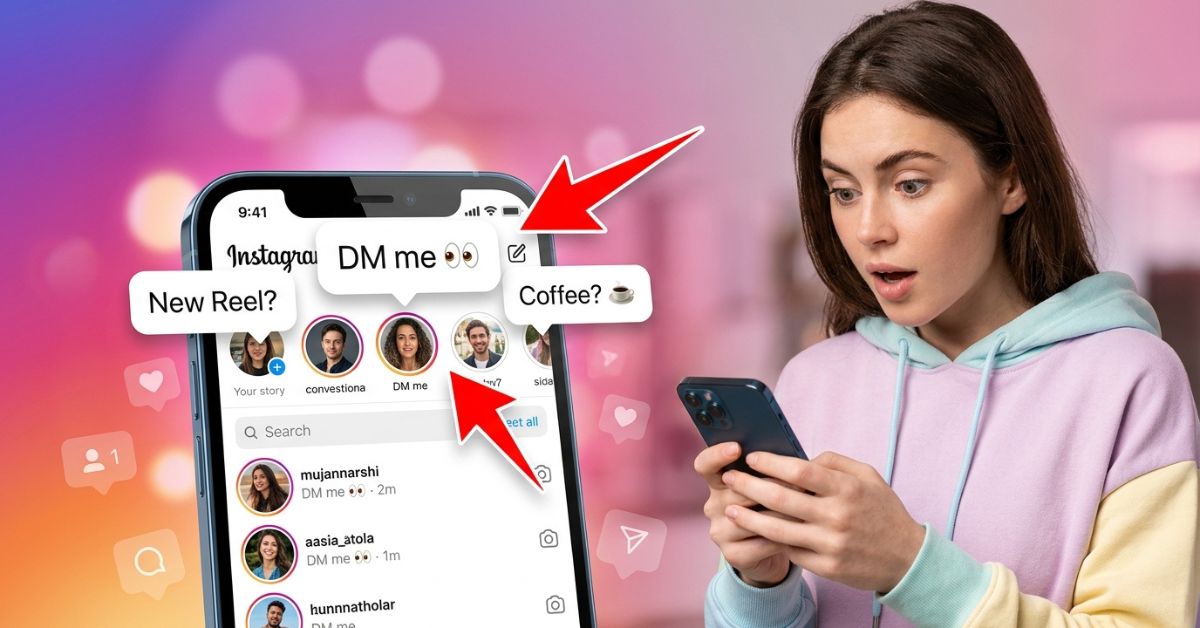
Think of Instagram Notes as digital sticky notes for your profile. They are short messages that appear at the top of your inbox and on select posts. Unlike traditional posts or Stories, Notes do not require photos or videos. They give you a fast way to share thoughts or music with your connections.
According to the Instagram Blog, Instagram introduced Notes to give people a casual, lightweight way to express themselves and start conversations. In 2026, Notes remain popular as a low-pressure way to share updates with friends.
In this guide, you will learn how Notes work, how to post them, and how to use them for personal fun or business growth.
Quick Answer: What are Instagram Notes?
Instagram Notes are short status updates up to 60 characters long. They appear at the top of your Direct Message (DM) inbox. You can also attach a Note when sharing a post or Reel via the share menu. Notes stay visible for 24 hours. You can include text, emojis, and background music.
What Are Instagram Notes?
Instagram Notes are short status updates designed for fast sharing. They bring back the feeling of old-school messaging status updates.
Where Notes Appear
Notes appear in two main locations:
- The Instagram Direct Inbox: Floating right above your messages as small thought bubbles over profile pictures.
- When Sharing Posts and Reels: You can attach a Note when sending a post or Reel to your friends using the share menu.
+-------------------------------------------------------+
|              INSTAGRAM DIRECT INBOX                   |
|                                                       |
|   ( You )       ( Friend 1 )    ( Friend 2 )          |
|  [ Your Note ]  ["Coffee? ☕"]   ["Listening to 🎵"]   |
|     ( : )           ( :-D )         ( :-) )           |
|   Your Story       Alex            Sarah              |
+-------------------------------------------------------+
Key Features of Notes
- 24-Hour Expiration: Every Note automatically disappears after 24 hours.
- 60-Character Limit: Text Notes have a strict limit of 60 characters. This keeps messages brief.
- Text, Emojis, and Music: You can type a short text message, add emojis, or share a music clip.
- Notes in Share Menus: You can attach a Note when sending a specific post or Reel to your connections.
What Changed in 2026?
Meta updated Notes to work in more places across the app. You can now use interactive prompts to start conversations, and you can attach Notes when sharing posts and Reels through your share menu.
What You Can and Cannot Do
| Action | Allowed? | Details |
| Add Music Clips | Yes | Attach 30-second song previews from the music library. |
| Record Audio | No | Notes focus on text, emojis, and music. Voice messages are sent separately in DMs. |
| Edit Published Notes | Yes | You can tap your Note bubble to edit or update your message at any time. |
| Track Views | No | Instagram does not show a list of people who read your Note. |
| Schedule Notes | No | Notes must be shared in real time. |
Why Meta Introduced Notes
Meta created Notes to help users interact without the pressure of editing photos. According to Instagram, testing showed that people liked having a simple way to share what was on their mind and start private chats with friends.
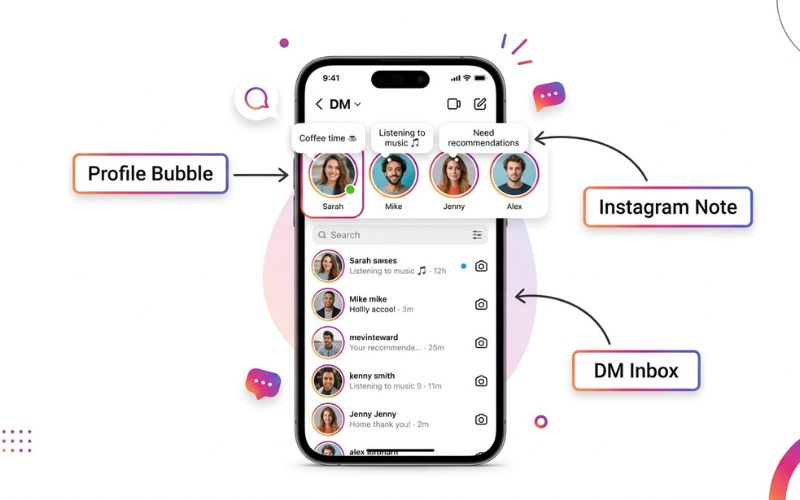
How Instagram Notes Work (Step-by-Step)
Using Instagram Notes is simple. Here is how to create, edit, and remove your Notes.
How to Create an Instagram Note
- Open the Instagram app on your mobile device.
- Tap the Instagram Direct icon in the top right corner of your feed.
- Tap your profile picture bubble at the top of the inbox.
- Type your message or tap the music icon to attach a song.
- Tap Share with to pick your audience (Followers you follow back or Close Friends).
- Tap Share in the top right corner.
Step 1: Open DMs  -->  Step 2: Tap Profile Bubble  -->  Step 3: Type & Share
   [ 💬 Inbox ]              ( You )                      "Coffee time! ☕"
                            [ + Note ]                      [ Share ]
How to Edit or Delete a Note
To edit or delete a Note, tap your profile picture bubble at the top of your inbox. You can type a new message to replace your active Note, or select Delete note to remove it completely.
How to Add Notes to Posts and Reels
- Find any Post or Reel on Instagram.
- Tap the Paper Airplane icon (Share button).
- Tap Add Note at the bottom left of the menu.
- Type your message and tap Share.
How Voice Messages Work
If you prefer to send audio instead of typing, you can send a voice message in your direct message chats:
- Open a direct message chat in your inbox.
- Press and hold the Microphone icon next to the message box.
- Record your audio message and release the button to send it.
Note: Voice messages require microphone permissions turned on in your phone settings.
Who Can See Your Instagram Notes?
Privacy is a core part of how Notes work. Unlike public feed posts, Notes are designed for smaller groups.
                 +--------------------------+
                 | Who Can See Your Notes?  |
                 +--------------------------+
                              |
      +-----------------------+-----------------------+
      |                                               |
[ Mutual Followers ]                         [ Close Friends List ]
People you follow back                       Custom list of selected
who also follow you.                         users you choose manually.
Audience Selection Options
When you share a Note, Instagram lets you choose between two groups:
- Followers You Follow Back: Only people with a mutual connection can see your Note.
- Close Friends: Only people added to your private Close Friends list can see your Note.
Privacy Settings and Account Limits
- Can strangers see Notes? No. Even on a public account, strangers cannot see your Notes unless you follow them back.
- Can blocked users see Notes? No. Blocked accounts cannot see any of your activity.
- Can business accounts use Notes? Yes. Professional accounts and creator accounts can share Notes with mutual followers.
Can You See Who Viewed Your Instagram Note?
No, you cannot see who views your Instagram Note. Instagram does not provide a view counter or a list of viewers for Notes.
Replies vs. Views
The only way to know if someone saw your Note is if they tap it and send you a direct message reply.
Myth vs. Fact
| Question / Feature | Myth | Fact |
| View Tracking | Instagram shows a list of people who read your Note. | False. There is no view counter for Notes. |
| Screenshot Alerts | Instagram alerts you if someone screenshots your Note. | False. Screenshots are completely private. |
| Saving Notes | Users can save your Note to their device. | False. Notes cannot be saved directly by viewers. |
| Analytics Dashboard | Professional Dashboard shows total Note impressions. | False. Analytics for Notes are not provided in Meta tools. |
Instagram Notes vs Stories vs Posts vs Reels
Choosing the right format helps you communicate better with your audience. Here is how Notes compare to other Instagram features:
| Feature | Notes | Stories | Posts | Reels |
| Visibility | Top of Inbox & Share Flows | Top of Feed & Profile | Main Feed & Profile Grid | Reels Tab & Explore |
| Lifespan | 24 Hours | 24 Hours | Permanent | Permanent |
| Best Use | Quick text updates & questions | Daily photos & videos | High-quality photos | Short entertaining videos |
| CTA Potential | High (Directs to DM) | Medium (Link stickers) | Low (Comment based) | Medium (Caption links) |
| Engagement Type | Private DM replies | Story replies & polls | Public comments & likes | Likes, shares & comments |
| Discoverability | Low (Mutuals only) | Medium (Hashtags) | High (Explore page) | Extremely High (Algorithm) |
Best Instagram Notes Ideas and Examples
Here are ready-to-use Notes for different types of accounts:
Funny & Relatable Notes
- “My favorite exercise is a cross between a lunge and a crunch. Lunch.”
- “Current mood: need a 6-month break twice a year.”
- “I am on energy-saving mode today.”
Student Notes
- “Drowning in textbooks send help 📚”
- “Coffee level: 99% ☕”
- “Who is studying for the bio exam? Let’s review together!”
Creator & Influencer Notes
- “New Reel is live! Go leave a comment 🚀”
- “Should my next video be a tutorial or a Q&A?”
- “Dropping a new vlog today! Guess the location? ✈️”
Small Business & Local Brand Notes
- “2 custom slots open for this weekend! DM to book.”
- “Rainy day special! Free pastry with any coffee today ☕”
- “DM ‘VIP’ to get early access to our weekend sale!”
Instagram Strategy: Turning Notes into Engagement
To turn Instagram Notes into a strong marketing tool, use strategic messaging that prompts direct replies.
The Micro-CTA Framework
A Micro-Call-to-Action (CTA) gives people a quick reason to reply. Keep it short by using this formula: [Hook or Question] + [Action Word].
+----------------------------------------------------------------+
|                   MICRO-CTA FRAMEWORK                          |
|                                                                |
|  [ Hook / Question ]    +    [ Action Word ]                   |
|  "Need new tunes!"           "Send me a song 🎵"              |
|                                                                |
|  Result: High-converting, short Note that drives direct DMs.  |
+----------------------------------------------------------------+
Building a Simple Note-to-Sales Funnel
[ Step 1: Post Note ]  -->  [ Step 2: User Replies ]  -->  [ Step 3: Send Value ]
"DM 'GUIDE' for free"         User messages "GUIDE"        Send link & build trust
- Post a Note: “DM ‘LEAD’ for my free cheat sheet 📄”
- User Replies: The user taps the Note and sends the keyword “LEAD”.
- Conversion: You reply with the link to your resource and start a genuine conversation in Instagram Direct.
Best Times to Post Notes
To get the most responses, post when your mutual connections check their phones:
- Morning (8:00 AM – 10:00 AM): People check messages after waking up.
- Lunch Break (12:00 PM – 1:30 PM): High activity during mid-day breaks.
- Evening (7:00 PM – 9:00 PM): Peak downtime when people browse social media.
Practical Tips for Different Users
- Fitness Coaches: Ask about daily struggles. Example: “What is your biggest health struggle this week?”
- Photographers: Promote open dates. Example: “1 session slot left for golden hour photos this Saturday! 📸”
- Freelancers: Share quick updates. Example: “Now accepting new design projects for next month. DM for pricing!”
- E-commerce Stores: Share exclusive offer codes to drive direct sales conversations.

How to Measure Whether Instagram Notes Are Working
Track your conversation signals to evaluate your Note performance over time.
Key Metrics to Watch
- Reply Volume: The total number of direct messages received per Note.
- Conversation Quality: Are followers asking genuine questions about your brand or content?
- Profile Visits: Notice if your profile receives more traffic on days you post Notes.
Performance Tracking Table
| Metric | What to Track | How to Calculate | Target Goal |
| Reply Volume | DM replies per Note | Count replies within 24 hours | More replies compared to past Notes |
| Lead Rate | Inquiries from DMs | (DM Inquiries / Total Replies) x 100 | Higher ratio of chats turning into leads |
Common Mistakes to Avoid
- Posting Without a Prompt: Avoid simple statements like “Happy Monday.” Always ask a question to encourage replies.
- Ignoring Active Times: Do not post when your audience is offline.
- Over-Promoting: Avoid posting continuous sales pitches. Keep the focus on starting casual conversations.
- Forgetting Notes on Content: Remember to attach Notes when sharing feed posts and Reels to highlight key points to mutual friends.
Troubleshooting Instagram Notes
If your Instagram Notes are not working properly, use this guide to fix technical issues.
               +----------------------------------+
               | Troubleshooting Steps            |
               +----------------------------------+
                                |
      +-------------------------+-------------------------+
      |                                                   |
[ App Updates ]                                    [ Clear Cache ]
Ensure you have the                            Remove temporary data
latest version installed.                      to clear app glitches.
Common Issues and Solutions
| Problem | Likely Cause | Solution |
| Notes Feature Missing | Outdated app version or feature rollout delay. | Update the app in the App Store or Google Play Store. |
| Cannot Submit Note | Network error or exceeded character limit. | Check your Wi-Fi connection. Keep text under 60 characters. |
| Friends Cannot See Note | Missing mutual follow status. | Verify that you follow each other back on Instagram. |
| Voice Messages Not Working | Missing app permissions. | Open phone Settings, select Instagram, and enable Microphone permissions. |
If problems persist, visit the official Instagram Help Center to submit a support report.
Conclusion
Instagram Notes offer a simple, low-pressure way to communicate across the app. Unlike public posts or edited Stories, Notes focus on short, authentic text updates that spark direct conversations.
To get the best results, experiment with different Note styles throughout the week. Mix short questions, prompts, and music to see what drives the most replies to your inbox.
Frequently Asked Questions
What are Instagram Notes?
Instagram Notes are short status updates up to 60 characters long. They sit at the top of your inbox or in share flows for posts and Reels.
How long do Instagram Notes last?
Every Instagram Note lasts for 24 hours before automatically disappearing.
Where do Instagram Notes appear?
Notes appear at the top of your Instagram Direct inbox. They can also appear when sharing posts and Reels using the share menu.
How do you create a Note?
Open your DM inbox, tap your profile picture at the top, type your message, choose your audience, and tap Share.
Can you edit a Note?
Yes. Tap your active Note bubble in your inbox and type your changes to update your message.
Can you delete a Note?
Yes. Tap your active Note bubble in your inbox and select Delete note.
Can everyone see my Notes?
No. Only people you follow back, or users on your Close Friends list, can see your Notes.
Can strangers view my Notes?
No. Strangers cannot view your Notes unless you follow them back.
Can you see who viewed your Instagram Note?
No. Instagram does not provide a view list or view counter for Notes.
Can someone screenshot my Note?
Yes. However, Instagram does not send a notification if someone takes a screenshot of your Note.
Can Notes include music?
Yes. You can attach a 30-second music clip to your Note by tapping the music icon before sharing.
Can businesses use Instagram Notes?
Yes. Professional accounts and creator accounts can use Notes to communicate with mutual followers.
Do Instagram Notes increase engagement?
Yes. Notes encourage direct replies, which increases your overall inbox activity and strengthens audience connections.
Do Instagram Notes affect the algorithm?
Starting more direct message chats shows Instagram that users enjoy interacting with your profile.
Are Notes better than Stories?
Notes are better for quick text updates and driving private replies. Stories are better for sharing detailed photos and videos.
Can you schedule Instagram Notes?
No. Notes cannot be scheduled and must be posted live in real time.
You May Also Like:
Common Instagram Privacy Settings You Should Turn On
How to Use Instagram Insights to Grow Faster
Disclaimer:
This article is for informational and educational purposes only. We try to keep the information accurate, but features may change over time. Some images may be AI-generated for illustration only. All trademarks, logos, product names, and copyrights belong to their respective owners. Always check official Instagram resources for the latest updates.

Eleanor Karen is an administrator at PVStory.co.uk who writes about digital tools, social media trends, and online resources. She shares helpful insights on Instagram Story Viewer tools and other web-based solutions, helping readers stay informed and make the most of their online experience.