
Tested & Verified: Updated for 2026. Features verified on the Instagram mobile app for iOS and Android.
Quick Answer
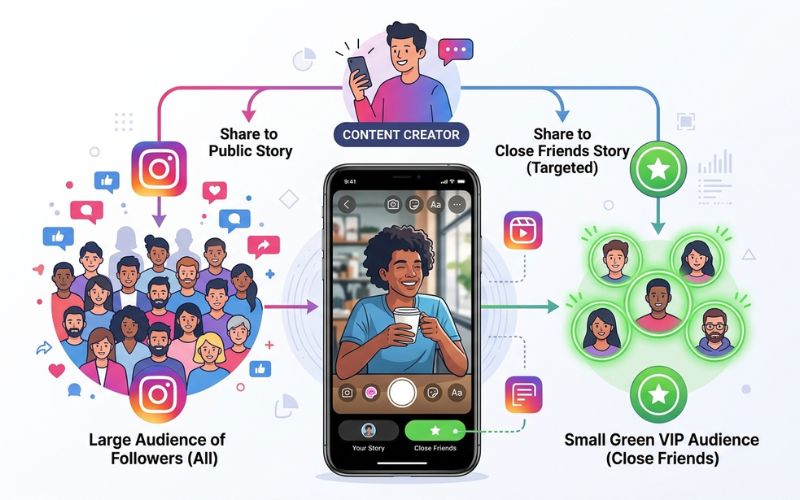
Instagram Close Friends is a built-in feature that lets you share posts with a custom list of selected followers. Only the accounts on your private list can view your Close Friends Stories, Reels, and Notes. Content created for this group features a bright green circle or star badge.
Creators and businesses use this tool to build brand loyalty with private discount codes and special polls. You can edit your list anytime in your account settings.
Key Takeaways
- Private Audience: Only chosen followers see your Close Friends posts.
- Supported Formats: Works with Instagram Stories, Reels, and Notes.
- Zero Notifications: Instagram never alerts people when you add or remove them.
- Total Control: Nobody else can view your list or request to join.
What Is Instagram Close Friends?
Instagram Close Friends is a privacy tool inside the Instagram app. It lets you share photos and short videos with a small list of chosen accounts.
Meta created this feature so users could share posts without broadcasting everything to all their followers. Instead of making a second private account, you share posts with a smaller circle directly from your main profile.
When you post for this list, viewers see a bright green ring around your profile picture. According to the Instagram Help Center, this green ring tells members that they are viewing private content.
How Instagram Close Friends Works
Instagram Close Friends gives you direct control over who sees your private updates. You build one custom list per account.
Only you can manage your list. Members do not need to accept an invite to join.
[ Your Post ]
      │
      ├──> Shared with "Everyone" ───> Visible to All Followers
      │
      └──> Shared with "Close Friends" ───> Visible ONLY to Your Selected List
You can choose your story audience using three main formats:
- Instagram Stories: Photo or video updates that disappear after 24 hours.
- Instagram Reels: Short video clips shared directly to your private list.
- Instagram Notes: Short text updates that sit above your Instagram Direct Messages.
Feature History: How Close Friends Evolved
Meta regularly updates the Close Friends feature to add new features for users and creators. Here is how the tool developed:
- December 2018: Instagram launches Close Friends globally for Stories.
- Feed Posts and Reels: Meta expands Close Friends to main feed posts and Reels.
- Instagram Notes: Notes support rolls out to private lists worldwide.
- Expanded Controls: Meta improves audience choices to make sharing faster across mobile devices.
How to Create and Edit Your Close Friends List
Setting up your list takes less than two minutes on your mobile device.
On iPhone and Android
- Open the Instagram app and tap your profile picture at the bottom right.
- Tap the Menu icon (three lines) at the top right.
- Select Close Friends under Account Settings.
- Tap the circle next to any user to add or remove them. On Android, you can use the top search bar to find names faster.
- Tap Done or Save to confirm.
Note: Close Friends list management is available through the Instagram mobile app on iOS and Android. Web browser support on Instagram.com is limited.
How to Share Stories, Reels, and Notes with Close Friends
Publishing content to your private group uses the standard posting buttons with one quick change.
Share a Story
- Swipe right from your feed to open the camera.
- Take a photo or record a short video.
- Tap the green Close Friends button at the bottom of the screen.
Share a Reel
- Create your video inside the Reel screen.
- Tap Next to reach the final share options.
- Tap Audience Selector, pick Close Friends, and tap Done.
- Tap Share.
Share a Note
- Open your Instagram Direct Messages inbox.
- Tap Your Note at the top of the screen.
- Type your short message.
- Tap Shared with, select Close Friends, and tap Share.
Instagram Close Friends Privacy Explained
Privacy is the core feature of the Close Friends tool. Here are direct answers to common privacy questions:
- Can people tell they are on your list? Yes. They will see a green ring or green star on your posts.
- Does Instagram notify when you add someone? No. Instagram never sends an alert when you add someone.
- Does Instagram notify when you remove someone? No. People will not receive a notification if you remove them.
- Can people request to join your list? No. There is no request button or form for followers.
- Can followers see your full list? No. Your list is private. Only you can view your members.
- Can someone share your Close Friends Story? Native app sharing is disabled, though viewers can still take a screenshot or screen recording.
- Are screenshots detected by Instagram? No. Instagram does not alert you if someone takes a screenshot.
- What happens if you block someone? Blocking an account removes them from your Close Friends list automatically.
- What happens after removing someone? They lose access to future Close Friends posts right away.
Privacy Callout
According to Meta Privacy Rules, your list stays hidden from all followers. Nobody can search for your list, and no notification is sent when you add or remove users.
How to Know If You’re on Someone’s Close Friends List
How do you know if a friend added you to their private list? You cannot search for someone’s list directly, but you can look for these simple signs:
- Green Story Ring: A bright green ring appears around their profile picture instead of the usual pink ring.
- Green Badge: A small green badge with a star appears in the top corner of their Story or Reel.
- Green Note Highlight: Their short text Note features a green circle in your Direct Messages inbox.
If you only see regular pink or orange rings around their updates, you are viewing public content.
Instagram Close Friends vs Friends vs Followers
Many users confuse regular followers with Close Friends. Here is how these privacy levels compare:
| Feature | Public Followers | Mutual Friends | Close Friends |
| Story Visibility | All Followers | All Followers | Selected List Only |
| Green Ring Indicator | No | No | Yes |
| Manual List Setup | No | No | Yes |
| Reels Support | All Followers | All Followers | Selected List Only |
| Notes Support | All Followers | Mutuals Only | Selected List Only |
| Privacy Level | Low | Medium | High |
Standard followers see everything you post publicly. Mutual friends follow you back, but they still see public posts. Close Friends is a manual list that gives exclusive access to your private updates.
Common Myths vs Facts
- Myth: Instagram tells people when you remove them from your list.
- Fact: Removes happen silently without any alerts.
- Myth: Using Close Friends boosts your reach across the entire app.
- Fact: It changes how you connect with list members, but it does not boost overall feed ranking.
- Myth: Followers can ask to join your Close Friends list.
- Fact: Followers have no way to request access.
- Myth: Instagram alerts you if a user takes a screenshot.
- Fact: Instagram does not notify creators about screenshots.
Best Ways to Use Instagram Close Friends
You can use Close Friends for personal updates, creator work, or business goals.
Personal Use
- Family updates: Share photos of children or life events with trusted relatives.
- Travel plans: Post real-time vacation updates without showing your location to strangers.
- Private news: Share big personal news before making a public announcement.
Creator Use
- Behind the scenes: Show raw, unedited videos of your daily routine.
- Early content: Give top fans early access to new projects.
- Exclusive polls: Use interactive stickers to gather feedback from loyal fans.
Business Use & Strategy
Brands use Close Friends to improve customer retention and social media engagement. Adding repeat buyers to a private group makes customers feel valued.
- VIP discount codes: Share special promo codes with top buyers.
- Flash sales: Give private members early access to sales.
- Product feedback: Ask trusted clients for input on new ideas before launch.
VIP Weekly Strategy Example
- Monday: Post a behind-the-scenes Reel showing product design.
- Wednesday: Post a private Story poll to vote on new colors.
- Friday: Drop an exclusive 20% promo code in a Close Friends Story.
Does Close Friends Affect the Instagram Algorithm?
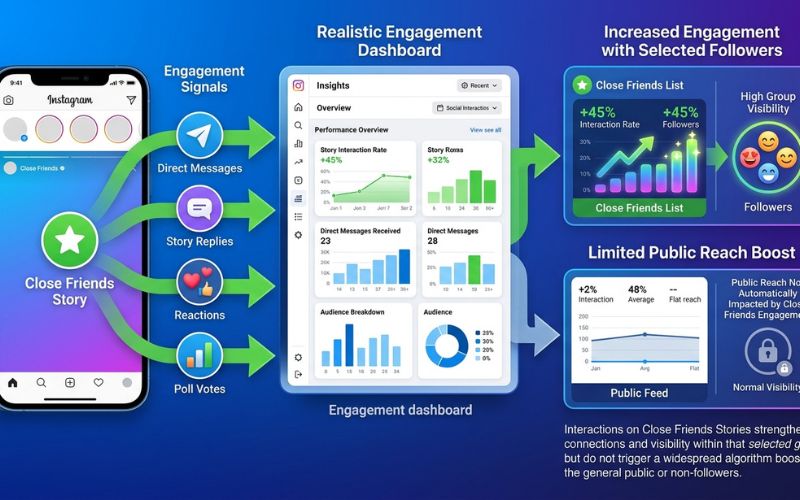
Using Close Friends changes how individual followers interact with your account, but it does not boost your main profile automatically.
When you share private posts, viewers are more likely to send Story replies or start Direct Messages. Instagram notices these high engagement signals. The app sees strong message history as a sign of a close relationship. As a result, Instagram may move your public Stories closer to the front of those specific users’ feeds.
However, Instagram feed ranking relies on many different signals. Using Close Friends alone does not increase your reach for general followers.
When NOT to Use Close Friends
Close Friends is helpful, but it is not always the right choice. Avoid using it in these situations:
- Mass Announcements: Do not use Close Friends if you want maximum views on big news.
- Public Contests: Public giveaways need wide reach, so post them to all followers instead.
- Broadcast Messages: If you want to send one-way news to thousands of fans, use Instagram Broadcast Channels instead.
Best Practices & List Management Checklist
Use this merged checklist to manage your private list safely and effectively:
- [ ] Run a Monthly Audit: Review your account list every 30 days to remove inactive accounts or old contacts.
- [ ] Keep the Group Small: Limit your members so the group feels truly exclusive.
- [ ] Reward Top Viewers: Add followers who reply to your public Stories often as a special thank you.
- [ ] Encourage Direct Messages: Use question stickers to start private chats in Instagram Direct.
- [ ] Protect Personal Info: Avoid sharing sensitive details like home addresses, even with a private group.
Troubleshooting Common Issues
- Missing Close Friends Button: Update your Instagram app in the App Store or Google Play Store. Older versions may lose feature access.
- Cannot Share Reel to Close Friends: Clear your app cache in settings, or check that your app supports the latest Audience Selector update.
- List Changes Not Saving: Check your internet connection. Log out and log back in to refresh account settings.
Who Should Use Instagram Close Friends?
- For Private Users: Close Friends is ideal if you want to share personal moments without making a secondary private account.
- For Creators: It is a great tool for building brand loyalty and connecting directly with your most engaged fans.
- For Businesses: Use it sparingly to reward repeat customers with special perks, early access, and private discounts.
Frequently Asked Questions
What is Instagram Close Friends?
Instagram Close Friends is a privacy feature that lets you share Stories, Reels, and Notes with a chosen group of followers instead of your whole audience.
Does Instagram notify when you add or remove someone?
No. Instagram does not send a notification when you add or remove a user.
Can someone ask to join Close Friends?
No. Followers cannot request access to join your list.
Can you have multiple Close Friends lists?
No. Meta currently allows only one Close Friends list per account.
Can businesses use Close Friends?
Yes. Businesses use Close Friends to offer VIP discount codes and early product access to loyal buyers.
Can you share Reels and Notes with Close Friends?
Yes. Select Close Friends in the audience settings before posting a Reel or Note.
Can someone screenshot Close Friends Stories?
Yes. Instagram does not block screenshots, and the app does not send an alert if someone takes one.
Does Close Friends affect overall reach?
It increases Direct Message interactions with close members, but it does not boost overall feed ranking for public followers.
Can private accounts use Close Friends?
Yes. Private accounts can use Close Friends to share content with a smaller group within their approved followers.
You May Also Like:
Instagram Broadcast Channels: Complete Guide
How Instagram Notes Work and Why People Use Them
Disclaimer:
This article is for informational and educational purposes only. We aim to keep the information accurate, but Instagram features may change over time. Some images in this article may be AI-generated for illustration only. All trademarks, logos, brand names, and copyrights belong to their respective owners.

Eleanor Karen is an administrator at PVStory.co.uk who writes about digital tools, social media trends, and online resources. She shares helpful insights on Instagram Story Viewer tools and other web-based solutions, helping readers stay informed and make the most of their online experience.