

Ever wonder why your Instagram feed is full of posts from accounts you do not follow? You scroll past a friend’s photo, and suddenly you see a video of a dog making pasta from a total stranger.
These suggested posts can help you find cool new accounts, but they can also feel like too much. Here is an easy guide on how suggested posts work, why they show up, and how you can control what you see.
What Are Instagram Suggested Posts?
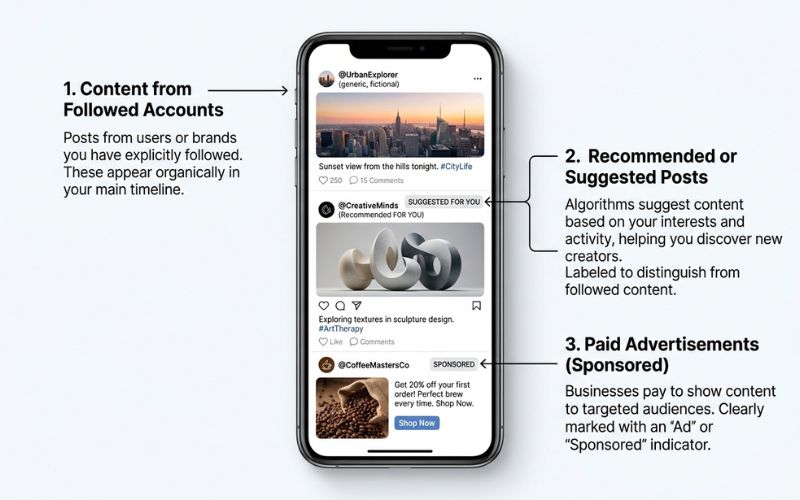
Quick Answer: Suggested posts are recommended photos, videos, and Reels from accounts you do not follow. Instagram shows them in your Feed and Explore pages to help you find new posts you might like.
Suggested posts are part of Instagram’s main way to show you new things. Your Feed shows recent posts from accounts you follow, along with recommended posts from accounts you do not follow. The order and number of these posts can change.
Instagram uses recommendations to help you find posts from accounts you do not follow yet. This helps you find topics you might enjoy.
Why Does Instagram Show You Suggested Posts?
Instagram says Feed, Explore, and Reels use different systems and clues to pick content for you. The app looks at how you use Instagram to guess what you will find interesting.
Here are the main clues that decide what shows up in your feed:
- Your Activity: Instagram looks at what you like, comment on, share, save, and watch. For Reels, Instagram guesses if you will share, watch to the end, like, or open the sound page.
- Accounts You Interact With: Recommendations use your past actions with the account that posted, plus other posts you recently liked or followed.
- Information About the Post: Instagram counts how many people like, comment, share, and save a post, and how fast they do it.
- Information About the Account: How often you interact with the account that posted can change what gets suggested to you.
- Your Personal History: Instagram uses your past activity and watching history to pick posts for you.
- Connected App Activity: According to Instagram’s help page, what you do on the Threads app can also change your suggested content.
Does Instagram Suggest Posts Because Someone Looked at Your Profile?
When picking recommendations, Instagram looks at your activity, accounts you follow, likes, and post details. They do not use profile views as a reason to show a suggested post in your feed.
Instagram uses thousands of clues to pick what you see. These include your recent actions, followed pages, predicted likes, how new a post is, and details about the account.
Where Do Instagram Suggested Posts Show Up?
Suggested posts show up in a few spots in the app, and Instagram uses different systems to pick posts for Feed, Explore, and Reels.
- Main Feed: Shows posts from accounts you follow next to recommended posts from accounts you do not follow.
- Explore Tab: The Explore grid suggests photos and videos from accounts you do not follow using clues like likes, saves, and shares.
- Reels Tab: The Reels feed mostly shows recommended short videos by guessing if you will share, watch to the end, like, or tap the sound page.
| Page | Purpose | Main Goal | Major User Clues |
| Feed | Stay updated on friends and top interests | Mix followed posts with top recommendations | Guesses like staying on a post for a few seconds, commenting, liking, sharing, tapping the profile photo, and how new the post is |
| Explore | Find new topics and accounts | Help you find new interests | Guesses like liking, saving, and sharing |
| Reels | Fast video fun | Keep you watching short videos | Sharing, watching to the end, liking, and opening the sound page |
Suggested Posts vs. Ads vs. Suggested Accounts
It is easy to mix up the different labels you see while scrolling. Not every unknown post is an ad, and not every recommendation is a post.
| Type | What It Is | Usually From | Main Purpose |
| Suggested Post | Recommended photo or video | Account you do not follow | Finding new posts |
| Ad | Paid post | Business | Showing a product, brand, or service |
| Followed-Account Post | Regular photo or video | Account you follow | Updates from people you follow |
| Suggested Account | Account recommendation | Account you may like | Helping you find people to follow |
Are Instagram Suggested Posts Ads?
Suggested posts are free recommendations based on your activity and liked pages. Ads are paid posts from businesses, and they usually say “Sponsored” or “Paid.”
How to Control Instagram Suggested Posts
You can manage, reset, and hide recommendations to control what shows up. Menu names can change depending on your phone, app version, and location.
How to Hide One Suggested Post
If you see a post you do not like, you can hide it and tell the app.
- In Feed, open the post’s Options menu (or tap and hold a post in Explore).
- Tap Not interested.
This hides the post and helps show fewer posts like it.
How to Stop Suggestions From One Account
If one account keeps showing up in your feed, you can ask Instagram to stop showing their posts.
- Open the post’s Options menu.
- Tap Not interested.
- Pick the option to stop seeing suggested posts from that account (like Don’t suggest posts from [account name]).
How to Pause Suggested Posts
In some versions of the app, you can pause suggested posts in your main feed for a short time.
- Find a suggested post in your main feed.
- Open the post’s Options menu.
- Pick the option to pause suggested posts for 30 days if you see it.
If your app has this feature, it will temporarily hide suggested posts in your main feed.
How to Hide Words and Phrases
You can lower the chances of seeing suggested posts that use specific words or hashtags.
- Open the Options menu on a suggested post and tap Not interested.
- Tap Don’t suggest posts with certain words (or check your Content preferences in settings).
- Type the words or hashtags you want to hide.
Instagram gives you this option to help show fewer suggested posts with those words.
Can You Turn Off Instagram Suggested Posts Forever?
You can reset your recommendations or change your Feed view:
- Following Feed: Set up to show posts only from accounts you follow.
- Favorites Feed: Set up to show posts from accounts on your Favorites list.
To find these views, tap the Feed chooser (like the Instagram logo) in the top corner to pick Following or Favorites.
Decision Guide: What Should You Do?
| Problem | Best Action |
| You do not like one post | Open post options $\rightarrow$ Tap Not interested |
| You keep seeing one account | Open post options $\rightarrow$ Tap Don’t suggest posts from this account |
| You want a short break | Use the 30-day pause option if your app has it |
| You do not like a topic | Use Don’t suggest posts with certain words for repeated words or hashtags |
| You only want posts from friends | Change your feed view to Following or Favorites |
How to Get Better Suggested Posts on Instagram
If you want better recommendations, you can teach the app what you like:
- Use “Not Interested”: Tapping this tells Instagram what you do not want to see.
- Like and Save Content You Enjoy: Like, comment on, and save posts about things you care about.
- Follow Accounts You Like: Following pages about your interests tells Instagram what topics matter to you.
- Skip Posts You Dislike: Simply scrolling past posts you do not like keeps similar posts away.
- Give It Time: Your Feed suggestions will change as you keep liking, following, and watching posts.
Why Is Instagram Showing So Many Suggested Posts?
The number of suggested posts in your feed can change due to app updates, test features, your activity, and how often accounts you follow post new things.
How Instagram Recommendations Work for Creators
For creators, recommendations follow a few simple steps:
- Eligibility: Your account and posts must follow Instagram’s Recommendation Rules and safety guidelines.
- Ranking: The app checks details about the post, the creator, and the viewer to match posts with people who do not follow you.
- Audience Response: Eligible posts are shown to a small group of people first to see if they watch, like, share, and save them.
- Reach: Posts that get good responses may be shown to larger groups of people.
Does Following the Rules Guarantee Your Post Will Spread?
No, following the rules does not guarantee your post will spread.
Following the rules just means your post is allowed to appear in places like Explore or Reels. It does not mean Instagram will automatically show your post to lots of people.
How Does Instagram Pick Which Posts to Show?
Instagram checks allowed posts for quality, original work, and viewer response. Instagram tries to show original posts first before copied videos. Identical copied videos may be swapped out for the original post in recommendations.
Why Instagram May Not Recommend Your Posts
If your views from people who do not follow you drop, it does not always mean your account is blocked. Views go up and down based on trends, competition, and what people want to watch.
However, these things can lower or block your chances of being recommended:
- Account Warnings: Breaking Recommendation Rules repeatedly (even in your bio or profile picture) can stop your whole account from being recommended for a while.
- Rule Issues: Posts that break Recommendation Rules can still be seen by your followers, but Instagram will try not to suggest them to people who do not follow you.
- Copied Content: Accounts that re-upload videos without making big changes can lose recommendation access. Duplicate posts may be replaced by the original source.
- Watermarks: Recommended posts must not have visible watermarks from other apps. Having them can stop your post from being suggested.
- Low Quality Content: Blurry or hard-to-see videos can keep posts out of recommendations.
- Clickbait: Using fake titles or begging for likes can cause posts to be blocked from recommendations.
- Political Content Rules: Posts about political topics may be limited in recommendation spots based on rules and account settings.
Note: A drop in views alone does not mean your account has a restriction. Check your Account Status page to see if there are any real issues with your account.
How to Check if Your Account Can Be Recommended
You can check your status inside the app:
- Open your Profile and tap the Menu (three lines) in the top right corner.
- Scroll down and tap Account Status.
- Tap Recommendation Status to see your details.
If Instagram finds a problem, this page will show which post caused it and tell you how to fix or appeal it.

Instagram Suggested Posts Myths and Truths
| Claim | Truth |
| Suggested posts are ads | False. Suggested posts are free recommendations; ads are paid posts from businesses. |
| Someone looked at my profile, so Instagram showed their post | False. Instagram does not use profile views to pick recommended posts. |
| Tapping “Not interested” blocks a topic forever | False. It tells the app to show less of that content, but it is not a complete block. |
| Pausing removes suggestions forever | False. Pausing is just a short break for Feed suggestions when available. |
| Following the rules guarantees viral reach | False. Following the rules means your post is allowed to be recommended, but views depend on how people react. |
| Low views mean an account restriction | False. Low views usually happen because of trend shifts, lower likes, or normal app changes. |
| Hashtags guarantee recommendations | False. Hashtags help group topics, but they do not force Instagram to recommend your post. |
Frequently Asked Questions About Instagram Suggested Posts
What does “suggested post” mean on Instagram?
Suggested posts are recommended photos, videos, or Reels from accounts you do not follow.
Are Instagram suggested posts based on profile views?
No. Instagram’s listed rules do not use profile views to pick suggested posts.
Why do unwanted suggested posts keep showing up after I hide them?
Tapping Not interested helps lower similar posts, but it does not block the whole topic forever.
Can a private Instagram account get suggested posts?
Yes. Private accounts see suggested posts in their feed just like public accounts, but their own posts are never shown to people who do not follow them.
Does Instagram use Threads activity for recommendations?
Yes. According to Instagram’s help page, what you do on Threads can change suggested posts on Instagram.
Why is my Instagram post not being recommended to people who do not follow me?
Your post might not be recommended if it breaks Recommendation Rules, has watermarks, is copied from somewhere else, or gets low views from the first group of viewers.
You May Also Like:
Wisestudyspot. com Explained: SEO, AI Tools, Reviews & Guide (2026)
How to Customize Your Instagram Feed
Disclaimer:
This article is for informational and educational purposes only. Instagram features, settings, and recommendation rules may change by app version, device, or region. We do not guarantee that all steps or results will be the same for every user. Some images may be AI-generated for illustrative purposes. All copyrights and trademarks belong to their respective owners.

Eleanor Karen is an administrator at PVStory.co.uk who writes about digital tools, social media trends, and online resources. She shares helpful insights on Instagram Story Viewer tools and other web-based solutions, helping readers stay informed and make the most of their online experience.