
You post a Story on Instagram, but nobody interacts with it. That can feel frustrating. Interactive stickers are the easiest way to fix this problem. They invite your audience to tap, answer, and stay on your content longer.
Two of the most popular tools are Instagram story polls and quiz stickers. Both give your audience a quick way to tap their screens. However, they work in different ways and yield different results.
In this guide, you will learn how each tool works and how to use them to grow your account.
Quick Answer: Should You Use Polls or Quizzes?
Instagram story polls give you a high number of taps because voting takes less than one second between two simple choices. Quizzes can help keep viewers on your screen longer because people pause to guess the right answer. Use polls when you want quick opinions, and use quizzes when you want to test knowledge or teach a quick lesson.
- Creators: Use polls for fast daily check-ins and quizzes for weekly fun trivia.
- Businesses: Use polls for product feedback and quizzes to highlight item features.
- Educators: Use quizzes to test viewer knowledge and polls to choose next week’s topic.
- Influencers: Use polls for style choices and quizzes for personal trivia.
What Are Instagram Story Polls and Quizzes?
Instagram offers interactive stickers in the Story editor sticker tray. These tools help you talk with your followers and turn passive watchers into active participants.
What is an Instagram Story Poll?
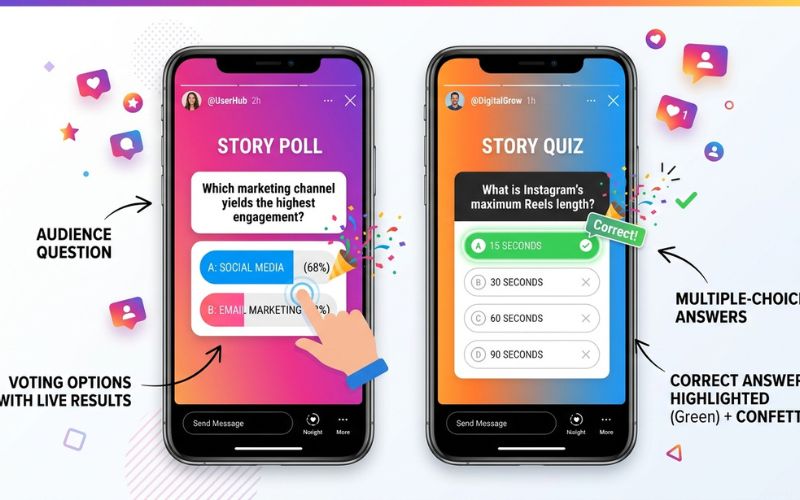
An Instagram Story poll is an interactive sticker that lets you ask a question with two customizable answer choices. Viewers tap their preferred choice to vote. As soon as they tap, they see the percentage of votes for each option in real time.
What is an Instagram Story Quiz?
An Instagram Story quiz is an interactive sticker that lets you ask a question with a correct answer. You add two to four answer options and select the right one in advance. When a viewer taps an option, the app reveals whether they guessed correctly with green confetti or a red screen shake.
Key Differences at a Glance
- Correct Answer: Polls have no right or wrong answers. Quizzes always have one correct answer.
- Option Limits: Polls allow two answer choices. Quizzes allow two to four choices.
- Results Display: Polls show voter percentages. Quizzes reveal the correct answer instantly.
- User Motivation: Polls tap into self-expression. Quizzes tap into personal knowledge and challenge.
Polls vs Quizzes: Feature Comparison
To choose the best sticker for your post, you need to understand how their features compare across different areas.
Purpose and Mechanics
- Purpose: Polls collect opinions, preferences, and feedback. Quizzes test knowledge and teach facts.
- Number of Answer Choices: Poll stickers allow two choices. Quiz stickers allow two to four choices.
- Customization: You can change the sticker color using the color wheel at the top of your screen.
User Experience and Psychology
- User Experience: Voting in a poll takes a fraction of a second. Answering a quiz takes a few extra seconds because viewers must read every choice.
- Correct Answer Support: Polls treat every answer equally. Quizzes highlight one correct answer in green.
- Educational Use: Quizzes excel at teaching because they give instant feedback on facts. Polls work better for gathering student opinions.
- Entertainment Value: Quizzes offer a game-like experience. Polls provide quick satisfaction by letting users see what others think.
Feature Comparison Table
| Feature | Poll Sticker | Quiz Sticker |
| Maximum Options | 2 choices | 4 choices |
| Has Correct Answer? | No | Yes |
| Shows Percentages? | Yes | Yes (after tapping) |
| User Effort Level | Low | Medium |
| Best for Lead Gen | High (easy follow-ups) | Medium (good for qualification) |
| User Motivation | Expressing an opinion | Challenge and curiosity |
Which Gets More Engagement?
Many creators find that Instagram story polls often get a high volume of fast taps, while quizzes can encourage longer view times.
Why Polls Receive Fast Taps
People scroll through Instagram quickly. A poll asks for a simple opinion between two choices, such as “Yes or No” or “Left or Right.” Instagram designed polls to be low-friction interactions. Low friction means an action takes almost zero effort. Because there is no wrong choice, casual viewers tap without overthinking.
Why Quizzes Can Generate Deeper Engagement
When viewers see a quiz, they pause their scrolling to read the choices carefully. They want to test their knowledge and avoid picking the wrong answer. This extra focus can increase your overall retention time. Retention time measures how many seconds a user stays on your post. The Instagram algorithm tracks engagement signals like watch time. When users stay longer, Instagram may show your Stories to more people.
Metrics Beyond the Initial Tap
Interactive stickers trigger several positive signals inside Instagram Insights and Meta Business Suite:
- Story Views & Reach: High sticker interaction pushes your Stories toward the front of the user tray.
- Completion Rate: Viewers who answer a quiz on the first slide are more likely to finish the entire Story sequence.
- Replies and DMs: Polls often trigger direct messages because voters want to explain why they picked a specific option.
- Navigation Metrics: Strong stickers reduce your exit rate and lower tap forward actions.
- Shares: Viewers share interesting quiz trivia with friends to test their knowledge too.
Practical Examples
- Creator Example: A travel creator posts a poll asking, “Which city should I visit next? Paris or Rome?” The fast tap rate helps boost overall Story views.
- Ecommerce Example: A skincare brand posts a quiz asking, “Which ingredient fixes dry skin?” Viewers tap “Hyaluronic Acid,” see the green confirmation, and click the product link.
- Local Business Example: A local gym uses a poll asking, “Do you prefer morning or evening workouts?” They use the response list to message voters about class schedules.
How to Create an Instagram Story Poll
Creating a poll takes less than a minute in the Instagram app. Follow these simple steps:
- Open the Story Camera: Swipe right from your main feed or tap your profile picture with the plus sign.
- Upload or Capture Media: Take a photo, record a short video, or select a background image from your gallery.
- Tap the Sticker Icon: Select the square smiley face icon at the top of your screen to open the sticker tray.
- Select the Poll Sticker: Scroll through the options and tap the sticker labeled Poll.
- Write Your Question: Type your question in the main text field.
- Customize Answer Options: Type your custom text into the two answer boxes.
- Publish Your Story: Move the sticker to your desired location on screen and tap Your Story to publish.
How to Create an Instagram Story Quiz
Setting up a quiz follows a similar process, with one extra key step.
- Open the Story Camera: Swipe right from your feed to open the camera interface.
- Select Your Background: Choose a relevant photo or video background that gives context to your question.
- Open the Sticker Menu: Tap the square smiley face icon at the top menu bar.
- Choose the Quiz Sticker: Tap the sticker labeled Quiz.
- Type Question and Answers: Write your question at the top, then fill in two to four potential options.
- Select the Correct Answer: Tap the letter icon (A, B, C, or D) next to the correct option to highlight it in green.
- Publish: Adjust the size and placement of the sticker, then share it to your Story.
How to View Poll and Quiz Results
Checking your votes helps you understand what your audience likes and gives you data to plan future content.
Where Results Appear and Who Can See Them
Open your active Story and swipe up on the screen. According to the Meta Business Help Center, this action opens your analytics view. While your Story is live, you can see total views, sticker taps, and a list showing the names of individual voters and their choices.
As the account owner, you can see these named votes while the Story is active. Other users cannot see who voted. Viewers can only see total percentage splits for polls or whether their own guess was correct for quizzes.
What Happens After 24 Hours
Your Story disappears from public view after 24 hours. You can view past Stories anytime by going to your Profile Menu > Archive. While the Archive lets you review overall vote percentages, detailed lists of named voters are only guaranteed while the Story is live. You can also save your poll Stories to a Story Highlight on your profile to keep the visual post visible to new visitors.
Polls vs Quizzes for Different Goals
Choosing between a poll and a quiz depends entirely on your current goal.
Growing Story Engagement
- Best Choice: Poll
- Why: Polls require minimal effort. They work best for encouraging quick taps from casual followers who rarely interact with your content.
Lead Generation
- Best Choice: Poll
- Why: Voting in a poll gives you a natural reason to start a conversation in direct messages with a warm lead.
Education & Training
- Best Choice: Quiz
- Why: Quizzes encourage users to pause, think, and retain information about your products, services, or industry.
Community Building
- Best Choice: Poll
- Why: Questions about personal habits and lifestyle make followers feel connected to you and the rest of your community.
Entertainment
- Best Choice: Quiz
- Why: Trivia challenges turn your Instagram Stories into a fun game for your audience.
Best Instagram Story Poll Ideas (With Strategic Explanations)
Instead of random questions, use poll structures that trigger high response rates. Here are proven concepts and why they work.
A/B Product Feedback Polls
- Example: Which color bag should we launch next? Brown / Black
- Why It Works: People love sharing their personal taste. This question makes customers feel like co-creators of your product line.
Habit Comparison Polls
- Example: Do you stretch before or after your workout? Before / After
- Why It Works: People like comparing their daily routines with others. It creates a friendly sense of competition.
Topic Selector Polls
- Example: What should my next YouTube video cover? Editing / Camera Gear
- Why It Works: It guarantees your next content piece already has proven demand from your audience.
Decision-Maker Polls
- Example: Should I keep this jacket or return it? Keep It / Return It
- Why It Works: It feels personal and authentic. Viewers tap because they want to help you make a real choice.
Best Instagram Story Quiz Ideas (With Strategic Explanations)
Quizzes work best when they challenge assumptions or teach an interesting fact.
Common Myth Quizzes
- Example: True or False: Eating late at night automatically causes weight gain. (A) True (B) False [Correct]
- Why It Works: It challenges a common belief. Users tap to test their knowledge and stay to learn the truth.
Product Feature Quizzes
- Example: Which ingredient in our serum blocks blue light? (A) Zinc [Correct] (B) Water (C) Oil (D) Salt
- Why It Works: It highlights key product benefits without sounding like a dry sales pitch.
Industry Trivia Quizzes
- Example: What year was the first espresso machine invented? (A) 1884 [Correct] (B) 1920 (C) 1950 (D) 1975
- Why It Works: Coffee shops and food brands can use this to build authority and entertain fans.
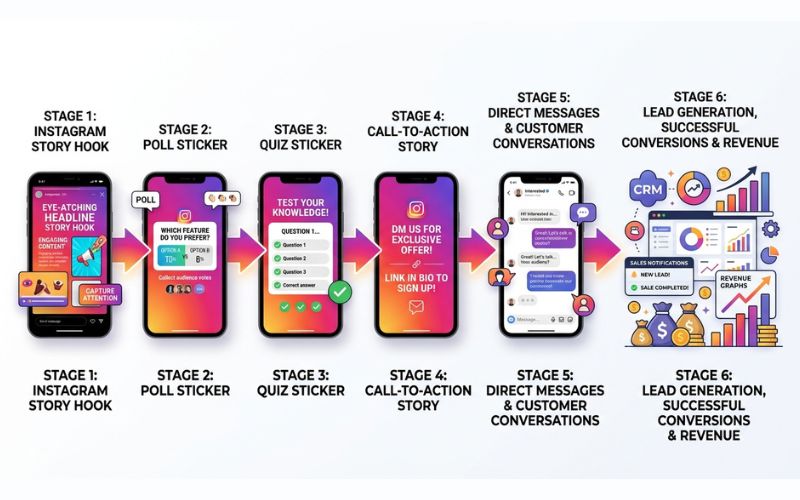
Strategic Funnel: Turn Poll Votes Into Conversations and Leads
Do not view polls and quizzes as standalone posts. Use them inside a conversion funnel that leads to sales or signups.
[Frame 1: Hook Story]
          │
          ▼
[Frame 2: Poll Story] ───► (Collects low-friction votes)
          │
          ▼
[Frame 3: Quiz Story] ───► (Tests knowledge & builds interest)
          │
          ▼
[Frame 4: Call to Action] ───► (Asks for a DM or link click)
          │
          ▼
[Direct Message Follow-Up] ──► (Automated or manual conversation)
The Poll-to-DM Workflow
When someone votes in your poll while it is live, open your Story responses and tap the message icon next to their name. Send a helpful, low-pressure message based on their selection.
Real Example: Business Coach
- Poll Question: “What is your biggest business hurdle this month?”
- Option A: Getting Leads
- Option B: Managing Time
- Follow-up DM for Option A: “Hey [Name]! Saw you voted for ‘Getting Leads’ on my Story. I just made a free 2-page guide on that. Would you like me to send the PDF link over?”
DM Automation Setup
If you run a business account with high vote volumes, messaging everyone by hand takes too much time. You can use approved platforms like ManyChat or Chatfuel. Depending on your tool setup and Meta API permissions, these tools can detect specific poll answers and automatically send a custom DM with a link or discount code.
Poll vs Quiz Do’s and Don’ts
Use this checklist to optimize your Stories and avoid common mistakes that lower engagement.
Do’s (Best Practices)
- [ ] Hook Viewers First: Place a strong background image or video on slide one before adding a sticker on slide two.
- [ ] Keep Wording Short: Use short words and keep answer options simple.
- [ ] Place Stickers Carefully: Keep stickers in the middle of the screen, away from profile icons and reply bars.
- [ ] Share Final Results: Post a follow-up Story showing the winning poll percentage or quiz answer.
- [ ] Post 2-3 Times Weekly: Space out interactive Stories so viewers do not get tired of voting.
Don’ts (Common Mistakes)
- [ ] Do Not Overcrowd the Screen: Avoid placing multiple interactive stickers on a single Story slide.
- [ ] Do Not Use Generic Questions: Avoid boring posts like “Happy Friday!” with a simple Yes/No poll.
- [ ] Do Not Skip Context: Always explain why you are asking a question on the previous slide.
- [ ] Do Not Ignore Responses: Never leave DMs or poll interactions unacknowledged.
- [ ] Do Not Post Too Many Consecutive Polls: Keep sequences to three or four slides total to protect your completion rate.
Poll vs Quiz Comparison Table (Decision Guide)
Use this quick summary table to choose the right tool for your immediate goal.
| Marketing Goal / Metric | Instagram Story Polls | Instagram Story Quizzes |
| Ease of Setup | Very Easy | Easy |
| Tap Volume | High | Moderate |
| Audience Watch Time | Short | Long |
| Direct Message Opportunities | Very High | Moderate |
| Customer Education | Low | Very High |
| Product Market Research | Very High | Low |
| Best Audience Type | Casual Viewers & New Followers | Dedicated & Curious Fans |
| Recommended Posting Frequency | 2-3 times per week | 1 time per week |
Frequently Asked Questions
Can you create polls on Instagram Stories?
Yes. You can add a poll to any photo or video Story using the interactive sticker tray inside the Instagram app editor.
Where is the Poll sticker?
Open the Story camera, select your media, and tap the square smiley face icon at the top of your screen. Scroll down until you see the sticker labeled Poll.
Do Instagram Story polls show who voted?
Yes. Creators can see a list of user names and their specific votes while the Story is live by swiping up on the screen.
Can other users see poll votes?
No. Other users can only see the overall percentage breakdown for each choice. They cannot see who voted for what.
How long do poll results last?
Poll results remain on your live Story for 24 hours. After 24 hours, aggregate vote percentages are usually saved in your account Archive, though named voter lists may no longer be available.
Can you edit a poll after posting?
No. You cannot edit a poll or quiz once it is live. You must delete the Story slide and upload a new one with your changes.
Which gets more engagement: polls or quizzes?
Polls tend to get a high volume of quick taps because choosing between two options requires minimal effort. Quizzes can help generate longer watch times as users pause to think about the correct answer.
Are quizzes better for businesses?
Quizzes are better for teaching customers about product benefits. Polls work better for gathering feedback and starting private DM sales chats.
Can I save poll results after 24 hours?
Yes. Open your profile menu, select Archive, and open the archived poll Story to review your overall vote percentages. Make sure to capture specific voter names within the first 24 hours.
How often should I post Story polls?
Post polls two to three times a week. This frequency keeps your audience engaged without overloading them with requests.
Can I automate DMs from poll responses?
Yes, for eligible accounts. You can connect approved third-party tools like ManyChat to send automatic direct messages whenever a viewer taps a poll option, depending on your Meta API permissions.
Should I use Polls or Quizzes with Close Friends?
Use polls for quick personal choices or meetup plans with Close Friends. Use quizzes for fun private trivia games about shared memories.
You May Also Like:
How to Make Interactive Instagram Stories
How to Change the Background Color of an Instagram Story
Disclaimer:
This article is for informational and educational purposes only. It does not provide official advice from Instagram or Meta. Some images in this article may be AI-generated for illustration only. All trademarks, logos, brand names, and copyrights belong to their respective owners. Always verify important information through official sources.

Eleanor Karen is an administrator at PVStory.co.uk who writes about digital tools, social media trends, and online resources. She shares helpful insights on Instagram Story Viewer tools and other web-based solutions, helping readers stay informed and make the most of their online experience.