

To tag someone Instagram post, tap Tag People on the share screen before you publish. Tap the image, search for the user’s handle, and select their account.
Here is a common 5-step method:
- Tap the + icon to create a new post and choose your media.
- Proceed through the edit steps until you reach the main caption screen.
- Tap Tag People.
- Tap the photo or video, search for the username, and tap it.
- Tap Done and hit Share.
How to Tag Someone in a New Instagram Post
Tagging an account links that user directly to your photo or video. Doing this before you publish sends a notification if your account settings and privacy rules allow it.
Choose the Photo or Video
Open Instagram and tap the + button at the bottom of the screen. Pick an image or clip from your phone gallery. Tap Next to edit filters, then tap Next again to reach the share screen.
Open “Tag People”
Look below the caption box on the share screen. Tap the Tag People button to open the tagging view.
Select and Confirm the Account
Tap the area on your photo where you want the tag to sit. A search bar will appear. Type the account name and tap the correct profile from the list. Drag the tag box to position it over a person. Tap Done to confirm.
Check the Tags Before Sharing
Look at the Tag People option to review which accounts you attached to the post. Verify that you selected the right profile, then tap Share.
Example: You post a photo from a hike with a friend named Alex. Tapping Alex in the photo lets you select their account so viewers can see who is pictured.
How to Tag Someone After Posting
You do not need to delete a live post if you forgot to add a friend. You can add new tags to published media through the post options.
- Open the published post on your profile.
- Tap the three dots (…) in the top right corner.
- Tap Edit.
- Tap Tag People on the image.
- Tap the photo, search for the handle, and select the user.
- Tap Done to save your update.

Can You Tag Someone in Instagram Carousels, Videos, and Reels?
Yes, you can tag other users across various Instagram formats, including photos, carousels, and Reels. However, each format handles tags slightly differently.
- Carousel Posts: You can tag accounts on the photos or videos inside a carousel post.
- Feed Videos: Video posts allow you to tag people during creation or through edit controls.
- Reels: You can tag accounts before sharing a Reel. Reels also support shared posting through the collaborator tool.
Example: A small business posts a gallery of a recent product photoshoot. They tag the studio photographer on slide one, the brand model on slide two, and the prop vendor on slide three.
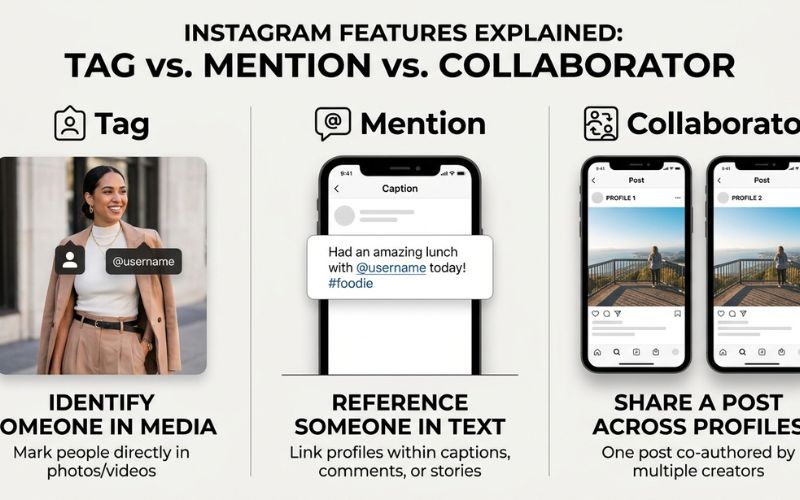
Tag vs Mention vs Collaborator on Instagram
Instagram offers three distinct ways to link another user. The right choice depends on how you want to reference the account.
| Feature | Best For | Where It Appears | Main Purpose |
| Tag | People shown or directly linked | Directly on the photo or video | Identify or give credit |
| Mention | Referencing a user in text | Caption, comment, or Story | Link to a handle using the @ symbol |
| Collaborator | Co-publishing a joint post | Shared post header | Share the post on two profiles after the invite is accepted |
Quick Decision Guide
- Use a tag to identify someone visible in the post.
- Use a mention to point to an account inside your text caption.
- Use a collaborator invite to invite another account to share a post on both profile grids once accepted.
What Happens When You Tag Someone on Instagram?
When you tag an account, Instagram may send a notification to that user depending on account privacy settings. Viewers can see tagged handles on posts they have permission to view.
However, tagging someone does not guarantee the post will show up on their profile. Every user has tag settings and approval options that control whether tagged uploads display on their account grid.
Why Can’t I Tag Someone on Instagram?
If tagging fails, the cause could be a typo, app issues, or account privacy settings.
| Problem | Possible Reason | What to Check |
| Account does not appear | Typo or tag permissions | Search the exact handle carefully |
| Tag will not save | App glitch | Try restarting or updating the app |
| Tag missing on profile | Pending approval or hidden tag | The user may need to approve or unhide the tag |
| No notification received | Notifications off or privacy rules | Check notification and account privacy settings |
The Correct Account Does Not Appear
Search works best when you type the exact handle. Additionally, users can adjust their tag settings to restrict who can tag or mention them.
Instagram Will Not Save the Tag
If the tag editor freezes, closing and reopening the app may help resolve temporary app glitches. You can also check your app store for pending updates.
Why Doesn’t My Tag Appear on Someone’s Profile?
If a tag stays on your post but fails to show on your friend’s profile tab, their account may use manual tag approval. The tag might also be hidden or removed by the tagged person.
Privacy, Blocking, and Account Settings
Account settings and privacy rules affect tag visibility and permissions according to Meta Privacy Policies.
How to Remove or Hide a Tag
You can edit tags on your own uploads, and you can manage tags that other users place on you.
Remove a Tag From Your Own Post
Open your post, tap the three dots (…), and select Edit. Tap the tag icon on your photo, select the username you want to remove, tap the small X, and tap Done.
Manage Tags on Photos of You
- Open the post where you are tagged.
- Tap your handle on the photo.
- Select the option to remove yourself from the post to delete the link completely.
- Tap Hide from My Profile if you want to stay tagged but keep the photo off your profile grid.
Tip: To control future tags, go to Settings and Privacy > Tags and Mentions, then look for tag approval controls.
Can You Tag Multiple People in One Instagram Post?
Yes, you can tag multiple people in a single post or across slides in a carousel.
Space your tags evenly so viewers can tap individual names easily on smaller phone screens.
Best Practices for Tagging People on Instagram
Follow these basic rules to tag politely without causing spam issues:
- Tag relevant accounts only: Only tag users who appear in the media or contributed to the work.
- Focus on credit over reach: Tag photographers, artists, or friends to give real credit. Do not tag famous accounts or strangers to gain views.
- Check handles carefully: Verify the exact spelling before saving so you do not tag the wrong person.
- Respect business partners: Businesses should tag vendors, clients, and partners to build strong relationships.
Frequently Asked Questions About Instagram Post Tags
How do I tag someone on an Instagram post?
Tap Tag People on the share screen, tap the photo, search for the exact username, select the account, and tap Done.
Can I tag someone after posting?
Yes. Open your published upload, tap the three dots, select Edit, and tap Tag People to add or adjust handles without affecting your caption text.
Can I tag someone who does not follow me?
You can tag accounts that allow tags from you based on their privacy settings. Private accounts send notifications to tagged users who follow them.
Can someone tag me if I don’t follow them?
Yes, unless you restrict tag permissions or turn on manual tag approvals in your privacy settings.
Can I tag someone without putting their @username in the caption?
Yes. Photo tags attach directly to the media, so you do not need to type their handle into the text box.
Does Instagram notify someone when I tag them?
Instagram sends an alert when settings and privacy rules permit notifications for that tag.
Why can’t I find someone to tag on Instagram?
Possible causes include typos, changed usernames, blocked accounts, or restricted tag settings.
Why doesn’t a tagged post appear on someone’s profile?
The account owner may use manual tag approvals, or they may have hidden the post from their profile.
Can I tag multiple people in one Instagram post?
Yes. You can add multiple account tags to a single photo or across slides in a carousel post.
Can I remove a tag after posting?
Yes. You can edit your own post to remove an account, or select your tag on someone else’s upload to remove yourself.
What is the difference between tagging and mentioning someone?
Tagging attaches an account directly to the media file. Mentioning uses the @ symbol inside written text captions, comments, or Stories.
You May Also Like:
Pixelspinx com Explained: What Is It and Is It Safe?
How to Add a Location to an Instagram Post
Disclaimer:
This article is for informational and educational purposes only. Instagram features and settings may change over time, so check current official guidance. Some images may be AI-generated for illustrative purposes. All copyrights, trademarks, and brand names belong to their respective owners. This guide does not replace official platform instructions or professional advice.

Eleanor Karen is an administrator at PVStory.co.uk who writes about digital tools, social media trends, and online resources. She shares helpful insights on Instagram Story Viewer tools and other web-based solutions, helping readers stay informed and make the most of their online experience.