

Quick Answer: Instagram Story filters are camera tools that change colors, lighting, and how your photos or videos look. To find them, open the Instagram Story camera, swipe right on the circle menu at the bottom, and tap the magnifying glass icon (Browse Effects). Tap the bookmark icon on any filter to save it directly to your main camera list so you can use it quickly later.
Instagram Story filters can quickly change the way your photos and videos look. Whether you want to brighten a picture of your morning drink or give your vacation videos an old-school movie look, picking the right filter makes a big difference.
In 2026, Instagram Story filters are smarter and easier to use than ever. Everything in this guide works well on both iPhone and Android phones. You will learn how to find, save, and search for popular filters. We will also show you quick fixes for common camera problems and how to choose the best look for your posts.
For official help, visit the Instagram Help Center. You can also download or update the app from the Apple App Store or Google Play Store.
What Are Instagram Story Filters?
Instagram Story filters are quick settings that change how your photos and videos look inside the camera app. People use them to fix bad lighting, smooth out skin, add color, or put fun moving items over their videos before sharing.
What Instagram Story Filters Actually Do
Filters add color layers, change lights, and change the picture style while you record.
- Live camera filters: These work while you record, so you can see the filter on your screen as you take the video.
- Edits after taking a photo: These are simple color layers you add by swiping left or right after taking a picture or video.
Using live tools lets you see exactly how your shot looks right away.
Instagram Story Filters vs Story Effects vs Post Filters
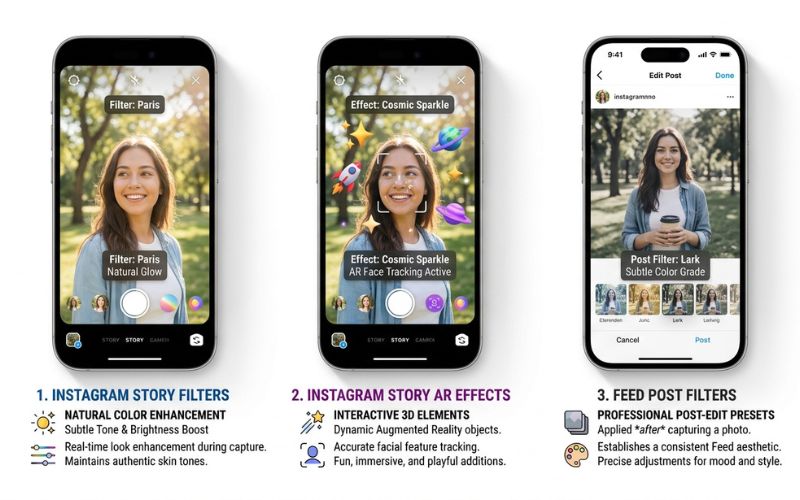
It is easy to mix up filters, moving AR effects, and main post tools. Here is how they are different:
| Feature | Story Filters | Story Effects (AR Masks) | Feed/Post Filters |
|---|---|---|---|
| What it does best | Changes colors, lights, and overall feeling | Adds 3D items, face changes, or background effects | Changes colors on photos for your main profile page |
| Works on Stories | Yes | Yes | No (you must save the photo first and then post it) |
| Works on Reels | Yes | Yes | Limited options |
| Best Used For | Quick mood changes and lighting fixes | Fun games, face changes, and background swaps | Keeping a clean, matching look on your profile page |
- Story Filters: Change light brightness, add warmth, and adjust background colors.
- Story Effects (AR): Smart camera tools follow face and room movement to add 3D items, fun makeup, or games to your screen. Meta makes official effects for users on the app.
- Feed Filters: Standard color choices (like Clarendon or Lark) used when posting a permanent photo to your main profile page.
How to Find Instagram Story Filters
Finding new filters inside the app takes just a few taps. Follow these steps to open the filter gallery:
- Open Instagram and tap the Story Camera in the top-left corner.
- Swipe right through the circle icons at the bottom of your screen.
- Scroll until you see the magnifying glass icon labeled Browse Effects.
- Tap Browse Effects to open the full effect gallery.
- Tap any filter to test it out live. Tap the middle of the screen to start recording.
Interface Note: On iPhones, swiping through the bottom circles feels very smooth. On Android phones, the icons might look a little flat, but the buttons and search steps are the same.
How to Save Instagram Story Filters for Later
Saving your favorite filters keeps your camera neat and saves you time later.
- The Save Bookmark: When previewing a filter, tap the bookmark icon on the preview screen. This saves the filter right to your main camera list.
- From a Friend’s Story: Tap the name of the filter under their username at the top left of the screen. Tap Save Effect in the menu that pops up.
- From a Creator Profile: Visit the creator’s main profile page. If available, tap the sparkle icon above their photo grid to see their custom filters, then tap the save icon.
- Remove Saved Filters: Swipe to the saved filter in your camera circle menu. Tap its title at the bottom of the screen, then tap Remove.
Best Instagram Story Filters in 2026
Choosing the right filter depends on what you are filming. Here are the top types of filters people use most:
Natural Everyday Filters
- Best Use Case: Daily videos, gym workouts, and casual morning coffee updates.
- Style: Soft lighting, smooth skin, and bright natural colors.
- Strengths: Keeps your photos looking clear and real.
- When to Avoid: Dark rooms where the camera picture looks fuzzy.
- Real Example: A coffee shop filming a drink being poured in bright sunlight.
Aesthetic & Vintage Filters
- Best Use Case: Outfit posts, daily life videos, and street photos.
- Style: Warm old-school film grain, soft colors, and classic light effects like 90s camera shots.
- Strengths: Gives your video a cool, artistic look right away.
- When to Avoid: Detailed product photos where real item colors need to show clearly.
- Real Example: A clothing store showing off denim jackets on a walk outside.
Selfie & Portrait Filters
- Best Use Case: Talking directly to the camera, beauty tips, and personal updates.
- Style: Warm skin colors, slightly blurred backgrounds, and bright eyes.
- Strengths: Helps you look ready for the camera without extra makeup apps.
- When to Avoid: Group photos, because face filters can glitch when there are many faces.
- Real Example: A skincare creator talking about their nighttime routine.
Travel & Outdoor Filters
- Best Use Case: Scenic views, beach trips, and hiking videos.
- Style: Deep blue sky and water colors, bright greens, and clear sunlight.
- Strengths: Makes outdoor scenes pop off the screen.
- When to Avoid: Dim indoor rooms with yellow light bulbs.
- Real Example: A travel blogger recording clear blue water at a sunny beach.
Food Photography Filters
- Best Use Case: Cafe visits, food menus, cooking videos, and bakery shots.
- Style: Warm colors, bright whites, and soft shadows that highlight food details.
- Strengths: Makes food look fresh and tasty without turning colors orange.
- When to Avoid: Dark bars or rooms with bright neon lights.
- Real Example: A bakery sharing a video of hot pastries coming out of the oven.
Business & Product Showcase Filters
- Best Use Case: Unboxing gifts, store displays, and product guides.
- Style: Clean whites, true real-life colors, and smooth pictures with no grainy spots.
- Strengths: Shows product details clearly so shoppers see exact items.
- When to Avoid: Casual personal chats where a plain studio look feels too cold.
- Real Example: A shoe brand showing close-up shoe stitching under studio lights.
How to Search for Specific Creator Filters
If you know the exact name of a filter or maker, searching is very quick.
- Open the Browse Effects gallery from your camera tray.
- Tap the magnifying glass in the top-right corner.
- Type the filter name or the creator’s username into the search bar.
- Test the filter and tap the save button to add it to your camera.
You can also find new options on Instagram Reels. Tap the filter name at the bottom of any Reel to open its info page, test it live, or save it to your Story camera.
Can You Use Instagram Story Filters on Reels and Posts?
Learning how camera tools work across the app helps you share photos and videos in different ways.
- Stories: Camera filters and official AR masks work right inside Stories.
- Reels: Most saved Story filters work inside the Reels camera. Tap the sparkle icon on the side menu to open your saved list.
- Feed Posts: Story filters do not work inside the normal main post camera. To use a Story filter on a main photo post, take the photo with your Story camera first, save it to your phone’s photo library, and then post it to your main profile page.
| Format | Saved AR Masks Supported? | Live Camera View? | Post-Capture Tints? |
|---|---|---|---|
| Stories | Yes | Yes | Yes (Basic color swipes) |
| Reels | Yes | Yes | Yes (Limited) |
| Feed Posts | No | No | Yes (Classic feed presets) |
How Businesses and Creators Should Choose Story Filters
For businesses and content creators, keeping a matching look builds trust. Using random filters every day can make your page look messy.
- Fashion & Clothes: Use clean, clear filters with real colors. Avoid heavy grain or strong color changes that hide clothing details.
- Beauty & Skincare: Choose soft glow options that keep natural skin tones. Avoid big face changes or fake makeup effects.
- Fitness & Health: Select sharp focus and bright lighting to bring energy to gym shots. Avoid light pastel or vintage filters that look washed out.
- Stores & Products: Pick bright filters with studio light that show true colors. Avoid busy background effects that take focus away from products.
Visual Branding Tip: Pick two or three main filters that match your style. Stick to these same options so your followers recognize your posts right away as they scroll.
How to Make Instagram Stories Look Professional
Filters make your posts look good, but basic setup steps decide how high-quality your story looks.
Adjust Filter Intensity
Many filters have a slider bar on the left side of the screen when turned on. Drag the slider down to lower the filter strength to around 40% or 50%. This keeps your photos looking natural while fixing bad lighting or dark shadows.
Improve Layout and Text Readability
Keep text and stickers easy to read for your viewers. Put words over plain or simple backgrounds so they stand out. Never place titles or link buttons near the top or bottom edges of the screen, where app buttons block them.
Professional Checklist:
- Filter strength turned down so the photo looks real.
- Text colors are easy to read against the background image.
- Important text is kept away from the top and bottom screen edges.
- Stickers and link buttons are placed where people can tap them easily.
Common Problems with Instagram Story Filters
When filters glitch or will not load, try these simple fix steps.
Browse Effects Is Missing
An old app version causes this problem most of the time. Update Instagram in the Apple App Store or Google Play Store. If that does not work, log out of your account, close the app completely, and log back in.
My Favorite Filter Disappeared
Filters disappear if the creator deletes them, if Meta removes them during policy updates, or if older custom effects are turned off. Search the creator’s main profile page directly to see if a newer version is available.
Search Doesn’t Show the Filter
Filter search needs exact spelling. Double-check the filter name or creator username. Search also needs working internet, so check your Wi-Fi or phone data.
Camera Doesn’t Show Effects
If your screen turns black when using a filter, check your phone settings. Open your phone’s main settings, tap Instagram, and make sure camera and microphone permissions are turned on. Restarting your phone often fixes stuck camera issues.
Can You Combine Multiple Instagram Story Filters?
No, Instagram does not let you use two live camera filters at the same time on one screen.
However, you can stack simple editing tools. Take your photo with a saved filter first. Then, swipe left or right across the screen to add a color layer over the saved photo.
Many people also save a photo to their phone’s photo library after using the first filter, then upload that picture back into the Story camera to add a second filter.
Common Mistakes to Avoid
Avoid these bad habits so your viewers stay engaged with your posts:
- Using too much filter: Setting heavy effects to maximum strength makes your pictures look blurry or fake.
- Changing styles all the time: Changing your filter look on every video confuses viewers.
- Unnatural skin colors: Choosing strong beauty masks that turn skin orange or pale lowers video quality.
- Ignoring text clarity: Putting dark words over dark filter backgrounds makes stories impossible to read.
- Forgetting to save favorites: Not bookmarking your top filters wastes time searching every day.

Quick Tips for Choosing the Right Instagram Story Filter
Follow this simple 3-step guide before posting:
- Pick your goal: Decide if your post is a quick personal update, a clear product show, or a scene outdoors.
- Check your lighting: Use color filters for dark rooms and natural filters for bright daylight.
- Lower the filter strength: Slide the filter bar down until the picture looks clear and natural.
Conclusion
Using Instagram Story filters well comes down to picking clean, clear looks that fit your goals. Save your top choices to your main camera list for quick access. Keep filter strength medium so your photos stay sharp, and use matching colors to keep a clean look across all your posts.
Frequently Asked Questions
What are Instagram Story filters?
Instagram Story filters are camera tools that fix lighting, change colors, or add 3D elements to photos and videos inside the app.
How do I find Instagram Story filters?
Open the Story camera, swipe right through the bottom circles, and tap the magnifying glass labeled Browse Effects to search the filter gallery.
How do I save Story filters?
Tap the bookmark icon on the filter page while testing any filter to save it right to your main camera list.
Why can’t I find Browse Effects?
Your app may be outdated. Update Instagram in your app store, check your internet connection, or restart the app.
Why did my favorite filter disappear?
Filters disappear if creators delete them, if account settings change, or if Meta removes them during system updates.
Can I use Story filters on Reels?
Yes, saved Story filters work inside the Reels camera. Tap the sparkle icon on the Reels side menu to view your saved list.
Are Story filters different from post filters?
Yes. Story filters work live in your camera with interactive effects. Main post filters are still color changes used on photos uploaded to your profile grid.
Can I stack multiple Story filters?
You cannot run two live filters at the same time. You can save the photo with your first filter to your phone’s photo library, re-upload it, and add another filter.
Which Instagram Story filters are trending in 2026?
Natural lighting boosters, soft 90s vintage film grain, and subtle face glow filters are popular choices.
Which filters work best for business accounts?
Clean, color-accurate filters with sharp clarity work best for businesses because they show real product details to shoppers.
Do filters reduce image quality?
Heavy face masks can affect how smooth your video plays because your phone tracks motion in real time. Simple color filters usually do not change video quality.
Can I create my own Instagram Story filter?
Currently, Meta provides official AR effects and filters directly inside the app, while older custom filters made by independent creators have been phased out.
You May Also Like:
How to Make Aesthetic Instagram Stories: Easy Ideas, Apps & Tips (2026)
Pushwiki com Explained: What It Is, Safety, How Trustworthy It Is & Full Review (2026)
Disclaimer:
This article is for informational and educational purposes only. Features and settings may change as Instagram updates its app. Some images in this article may be AI-generated for illustration only. All trademarks, logos, product names, and copyrights belong to their respective owners. Always verify details through official sources.

Eleanor Karen is an administrator at PVStory.co.uk who writes about digital tools, social media trends, and online resources. She shares helpful insights on Instagram Story Viewer tools and other web-based solutions, helping readers stay informed and make the most of their online experience.