
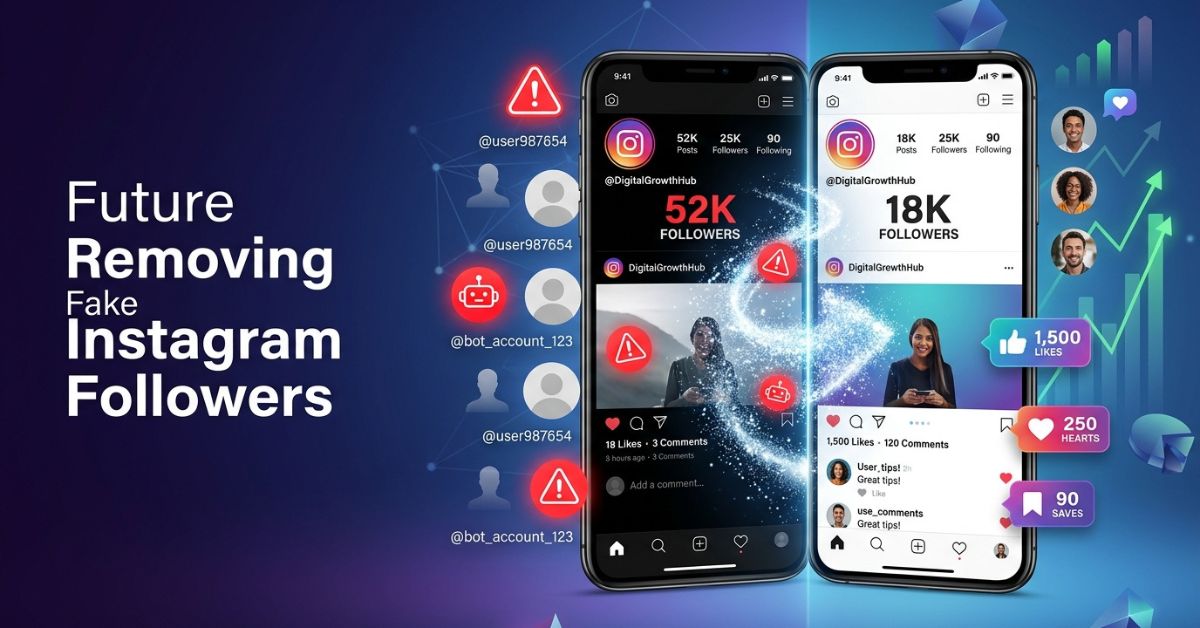
If your follower count is high but your post likes are low, fake followers might be hurting your account. Bots, spam accounts, and ghost followers clutter your list and mess up your interaction rate.
Cleaning up your profile is easier than you think. This guide matches Instagram’s official Help Center steps for removing unwanted followers and top creator tips to help you clean your list safely.
Quick Answer: How to Remove Fake Followers From Instagram
To remove fake followers quickly, follow these simple steps:
- Open Instagram, go to your Profile, and tap Followers.
- Find a suspicious profile and tap Remove next to their name.
- Check top sections like Flagged for review (or Potential spam in older app versions) to clear bots in groups.
✔ Quick Removal Checklist
- [ ] Open the Instagram app
- [ ] Go to your Followers list
- [ ] Check “Flagged for review”
- [ ] Tap “Remove” on fake profiles
- [ ] Keep daily removals under community safety rules
Why Removing Fake Followers Matters
Having thousands of followers looks great, but big numbers mean nothing if those accounts are fake. Real connections with your audience matter much more than a high follower count.
Removing fake profiles protects your account in three major ways:
- Protects brand trust: Sponsors check if your audience is real before paying for deals. High follower counts with zero comments raise red flags for brands right away.
- Saves business money: Business owners cannot sell products or services to computer bots.
- Builds real proof: A real audience creates genuine proof that attracts real customers.
Simple Example
Imagine a made-up creator account with 50,000 followers where most accounts are fake, so post likes and comments stay extremely low. Brands will skip this account because they do not trust the audience.
If that creator removes the fake accounts, the follower count drops, but real interactions go up. This makes the profile much more attractive to advertisers.
| Fake Followers | Real Followers |
| Low likes and comments | High likes and comments |
| No sales | Real customers |
| Weak trust | Strong brand trust |
What Counts as a Fake, Bot, Spam, or Ghost Follower?
Not every quiet follower is a bot. Knowing who to remove stops you from deleting real fans by mistake.
- Bot accounts: Automated profiles run by computer code to follow people automatically.
- AI-assisted fake accounts: Some fake accounts use computer-made pictures and text to look like real humans.
- Spam accounts: Profiles made only to drop dangerous links or scam offers.
- Bought followers: Large groups of accounts created by sketchy paid services to boost your numbers.
- Inactive (ghost) followers: Real accounts that people left behind years ago.
- Fake engagement networks: Groups of fake accounts that artificially like and comment on each other’s posts.
30-Second Fake Follower Check
Look for these signs on a profile to spot a fake user quickly:
- Random usernames: Names full of strange numbers and random letters (like
@user_98734982). - No profile photo: Uses the blank default picture or a stolen photo.
- No bio: The profile description is empty or has sketchy links.
- Few posts: Zero posts or just a few posts uploaded on the exact same day.
- Unbalanced numbers: Following 5,000 people, but only has 12 followers.
- Generic comments: Leaves simple replies like “Nice pic!” or random emojis on posts.
✔ Visual Audit Checklist
[ Blank Avatar ]+[ Strange Username ]+[ 0 Posts ]+[ Following 4,000+ ]= Fake Account

How to Remove Fake Followers From Instagram (Step-by-Step)
There are three safe ways to clean up your follower list using built-in tools inside the app.
Method 1 — Remove Followers Manually
This option works best for small accounts or small cleanups.
- Open the Instagram app and tap your profile picture at the bottom right.
- Tap on your Followers count at the top.
- Scroll through or search for a suspicious username.
- Tap the Remove button next to their name.
- Tap Remove again to confirm.
Note: Instagram never alerts users when you remove them. This method works for both public and private accounts.
[ Your Profile ] ➔ [ Followers ] ➔ [ Find Username ] ➔ [ Tap "Remove" ]
Method 2 — Use Instagram’s “Flagged for Review”
Instagram automatically spots suspicious profiles and groups them for you.
- Go to your Profile and tap Followers.
- Look at the top of the list for Flagged for review (called Potential spam in older app versions).
- Tap that section to see accounts Instagram flagged for you.
- Check the profiles to make sure no real fans are listed.
- Tap Remove all at the top, or delete them one by one.
[ Followers ] ➔ [ Top Section: "Flagged for Review" ] ➔ [ Review & Clear ]
Method 3 — Block Instead of Remove (When Necessary)
Sometimes removing an account is not enough, especially if a bot keeps following you back.
Here is how the choices compare:
| Action | What It Does | Best Used For |
| Remove | Quietly removes them from your list. They can follow you again later. | Normal fake accounts and ghost profiles. |
| Restrict | Hides their comments from others and moves their messages to requests. | Annoying users or mild trolls. |
| Block | Completely stops contact. They cannot find your profile or follow you back. | Repeated bots, spammers, and bullies. |
Does Instagram Automatically Remove Fake Followers?
Yes. Instagram has run large cleanups of fake likes and followers in the past, and Meta constantly removes fake accounts that break its rules.
When Meta cleans up its servers, you might see your follower count drop suddenly overnight. However, spammers make new accounts every day. Checking your list by hand helps catch the new bots that get past automated filters.
Will Removing Fake Followers Hurt Your Account?
No, Instagram does not punish accounts for removing followers, so clearing them will not get you shadowbanned. While your total follower count will drop right away, removing dead accounts improves your overall account health.
How the Algorithm Works
The Instagram computer system tests your new posts on a small group of your followers first. If that first group is mostly bots, no one likes or shares your post. The system thinks your post is boring and stops showing it to other people.
When you remove fake followers, your posts reach real humans who actually interact with them. Over time, getting more likes and comments tells the system to show your posts to bigger audiences.
Safe Daily Removal Limits and Action Blocks
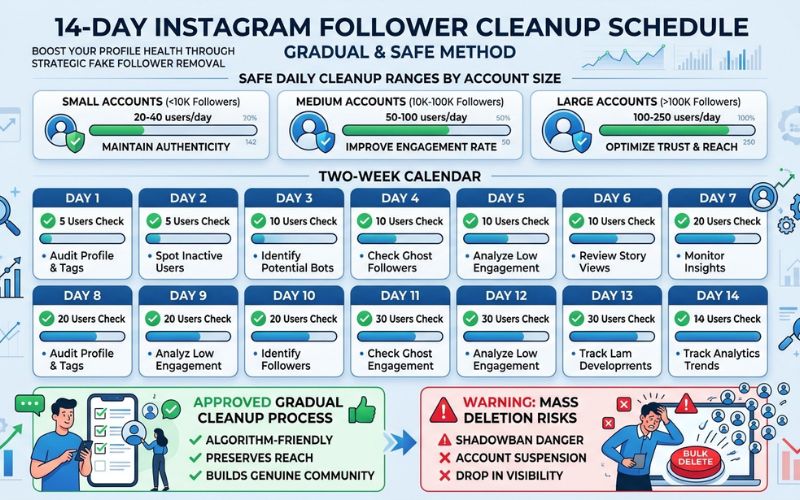
If you delete hundreds of profiles in a few minutes, Instagram security filters might give you a temporary action block. This block stops you from removing followers or liking posts for 24 to 48 hours.
To avoid action blocks, spread your cleanup over several days. Keep in mind that Meta does not publish official removal limits. These suggested numbers are safety tips based on creator experience:
| Account Size | Suggested Daily Removal Limit |
| Under 5K | 50 – 100 accounts per day |
| 5K – 20K | 100 – 150 accounts per day |
| 20K+ | 150 – 200 accounts per day |
Sample 14-day plan based on community safety tips (adjust based on how old and active your account is):
- Week 1: Clean up to 50 accounts per day (Days 1 to 7)
- Week 2: Clean up to 50 accounts per day (Days 8 to 14)
Best Instagram Fake Follower Removal Tools (2026)
⚠️ WARNING: Never share your Instagram password with outside tools that promise to auto-delete followers. Giving out your password breaks Instagram’s rules and can get your account banned permanently.
Outside tools can study public information to show you bot percentages, but these tools cannot delete followers safely for you. We tested these tools based on login rules, safety, price, and how they access public data.
| Tool | Best For | Login Needed | Safety | Pricing |
| SpamGuard | Direct account cleanup | Yes (App password) | Seller-reported | Seller-reported (Paid) |
| Modash | Creator and influencer checks | No (Public search) | High | Paid (Free trial available) |
| Creator Hero | Agency follower analysis | No (Public search) | High | Paid (Custom plans) |
| Influize | Quick audience checks | No | High | Free options available |
Manual Removal vs. Third-Party Tools
Choosing between manual cleanup and outside tools depends on your account size:
| Feature | Manual Removal | Third-Party Tools |
| Safety | High | Depends on method |
| Speed | Slow | Faster |
| Cost | Free | Paid |
| Accuracy | High | Changes by tool |
- Use Manual Removal if: You have under 10,000 followers, want to keep your account safe, and want total control over who gets deleted.
- Use Third-Party Tools if: You run a large agency account and only need a report to spot bot percentages without logging in.
I Bought Followers Years Ago—Can My Account Recover?
Yes, an account that bought followers in the past can fully recover. Many creators report clear improvements in likes and comments within one to three months of steady cleanup and good posting.
To fix your profile, stop buying followers right away and do not use automated tools. You must remove fake followers slowly while posting great content to show new activity to the Instagram algorithm.
4-Week Account Recovery Plan
- Week 1: Stop all automatic tools. Check your audience and set up your daily cleanup plan.
- Week 2: Remove 50 to 100 fake accounts daily using built-in Instagram tools. Post two great Reels.
- Week 3: Keep deleting bots at a steady pace. Reply to every real comment on your posts.
- Week 4: Open your Instagram Professional Dashboard to check your interaction stats. Focus on making posts that people save and share.
How to Prevent Fake Followers in the Future
Keeping bots away long-term saves you time on future cleanups.
- Avoid buying followers: Never pay for instant growth packages or bot services.
- Ignore sketchy giveaways: Avoid “loop giveaways” that force users to follow dozens of random accounts to win prizes.
- Report spam profiles: Tap the three dots on suspicious accounts and tap Report.
- Turn on comment filters: Go to settings to block spam words and hidden links automatically.
- Protect your account: Turn on two-factor login safety to protect your profile from hackers.
- Check connected apps: Review your account settings regularly and remove access for old outside apps.
Monthly Instagram Health Checklist
Do a monthly checkup to keep your profile clean and safe.
✔ Monthly Account Maintenance Checklist
- [ ] Check your newest 100 followers for bot activity
- [ ] Review interaction stats inside Instagram Insights
- [ ] Clear out the “Flagged for review” folder
- [ ] Check active logins in Security settings
- [ ] Disconnect old third-party apps in Connected Apps
[ Monthly Check ] ➔ [ Check New Followers ] ➔ [ Clear Flagged Bots ] ➔ [ Check Security ]
Common Mistakes to Avoid
Avoid these common mistakes when clearing your follower list:
- Removing hundreds of accounts at once: Deleting too many profiles fast triggers Instagram action blocks.
- Giving passwords to unknown websites: Keep your login details private at all times to prevent account theft.
- Blocking instead of removing: Blocking works, but simple removal is cleaner for standard ghost accounts.
- Deleting real quiet followers: Do not delete quiet fans who watch your posts but rarely leave comments.
- Ignoring post quality: Removing fake accounts only works if you keep uploading helpful posts for your real fans.
Final Thoughts
When growing your Instagram account, real interactions always beat high numbers. A smaller audience of active, loyal fans brings better reach and more sales than thousands of silent bots.
Use Instagram’s built-in tools to manage your audience safely. Regular follower checks keep your profile healthy, protect brand trust, and set your account up for real long-term growth.
Frequently Asked Questions
How do I remove fake followers on Instagram?
Open Instagram, go to your profile, and tap Followers. Tap the Remove button next to any fake account, or use the “Flagged for review” section at the top of your list.
Do removed followers get an alert?
No, Instagram does not send alerts or notifications when you remove someone from your follower list.
Can I remove followers on a computer?
Yes, you can log into Instagram on a web browser, view your followers list, and click Remove next to any account.
Does Instagram delete fake followers automatically?
Yes, Instagram regularly cleans up fake accounts and bot networks that break its rules. However, checking by hand helps catch new spam accounts faster.
How many followers can I safely remove each day?
Based on community estimates, smaller accounts under 5K followers can remove 50 to 100 accounts per day. Larger accounts usually remove 100 to 200 daily.
Can I remove followers without blocking them?
Yes, using the built-in Remove button takes the user off your list without blocking their account.
Are ghost followers the same as fake followers?
Not always. Ghost followers can be real people who stopped using Instagram, while fake followers are computer-made bots created for spam.
What is the safest fake follower remover?
The safest way is using Instagram’s official built-in removal tools inside the app.
Will removing fake followers improve my likes and comments?
Yes, removing fake accounts lowers your total follower count, which raises your overall interaction percentage and helps the algorithm show your posts to more people.
Should business accounts remove inactive followers?
Yes, business accounts need accurate audience numbers to track real sales and run good ad campaigns.
You May Also Like:
Why Instagram Suspends Accounts and How to Appeal
Instagram Notification Settings Guide
Disclaimer:
This article is for informational and educational purposes only. It is not official advice from Instagram or Meta. Some images in this article may be AI-generated for illustration. All trademarks, logos, brand names, and copyrights belong to their respective owners. Always check the official Instagram Help Center for the latest information.

Eleanor Karen is an administrator at PVStory.co.uk who writes about digital tools, social media trends, and online resources. She shares helpful insights on Instagram Story Viewer tools and other web-based solutions, helping readers stay informed and make the most of their online experience.