

Whether you want to share photos with close friends, get famous online, or sell things, picking the right profile setting on Instagram is important. Pick the wrong account and you might lose popular music, accidentally show your private photos to everyone, or lose tools that help you sell.
Instagram gives you three main choices. You can switch between these instagram account types anytime without losing your photos, videos, or followers. But switching will change your privacy right away and can limit the songs you can use. Here is a breakdown of all three options to help you choose.
Quick Summary
- Personal: Best for sharing privately with friends and family. Gives you all songs.
- Creator: Best for public video makers, artists, and online stars. Gives you visitor numbers, message filters, and popular songs.
- Business: Best for real shops, companies, and online stores. Gives you contact buttons, item tags, and automatic posting.
- Professional Account: A big group name Meta uses that just means both Creator and Business accounts.
Quick Answer: What Are the Different Account Types?
Instagram has three main account types: Personal, Creator, and Business.
When people hear Professional Account, they get confused. It is not a separate choice. It is just a group name that covers both Creator and Business profiles.
Here is who each one is for:
- Personal: For everyday people who want easy sharing and privacy.
- Creator: For people who make videos, famous people, and online stars who want to see their growth numbers.
- Business: For real shops, companies, and brands that want ads and easy ways for customers to call or message them.
Quick Comparison Chart
| Feature | Personal | Creator | Business |
| Can Make Account Private? | ✔ Yes | ✖ No | ✖ No |
| Can Make Account Public? | ✔ Yes | ✔ Yes | ✔ Yes |
| See Visitor Numbers? | ✖ No | ✔ Yes | ✔ Yes |
| Special Helper Screen? | ✖ No | ✔ Yes | ✔ Yes |
| Contact Buttons? | ✖ No | Optional | ✔ Yes |
| Show What You Do Label? | ✖ No | ✔ Yes | ✔ Yes |
| Run Paid Ads? | ✖ No | A Little | ✔ Yes |
| Song Choices | All Songs | Most Songs | Free / Safe Songs Only |
| Post Planning Tools | A Little | Some | Best |
| Connect Outside Apps? | ✖ No | A Little | ✔ Yes |
| Shopping Tools? | ✖ No | A Little | ✔ Yes |
| Best For | Regular Users | Video Makers & Stars | Shops & Stores |
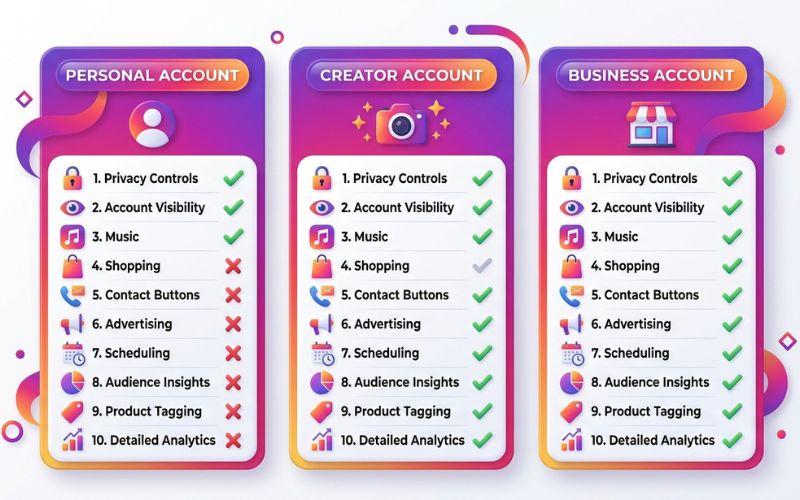
Understanding Each Account Type
Personal Account
This is the basic account everyone gets when they join Instagram. It is made for simple sharing without confusing numbers getting in the way.
Good Things
- Privacy: You can lock your account. Only people you say “yes” to can see your posts.
- All Songs: You get to use all popular radio songs and trending sounds.
- Simple Look: Clean and easy screen with no confusing charts.
Limitations
- No Numbers: You cannot see how many people looked at your posts.
- No Selling Tools: You cannot add call buttons, run paid ads, or tag items for sale.
Example: Sarah posts pictures of her family and food. She keeps her profile locked so only her real friends see her photos.
Creator Account
Made for public people, video creators, artists, and people building their own name online.
Good Things
- Growth Numbers: You can check how many people saw your posts, their age, and where they live.
- Creator Tools: You get special screens that help you make money and work with companies.
- Better Inbox: You can split your messages into three folders so you do not get overwhelmed.
- Fun Fan Tools: You can make private chat groups, sell monthly passes to fans, and get virtual money gifts.
- Popular Songs: You get to use popular radio music for your videos.
Limitations
- You cannot lock your account to keep it private.
- It is harder to connect with outside automatic posting apps.
Example: Alex takes photos of his trips. He uses a Creator account to see when his fans are online and keep fan messages separate from business offers.
Business Account
Made for companies, real stores, online shops, and people who offer local services.
Good Things
- Action Buttons: You can put buttons like Call, Email, Map Directions, or Book Now right on your page.
- Ad Management: You get easy tools to make paid ads on Facebook and Instagram.
- Instagram Shop: You can tag real items in your photos so people can click and buy them from your store.
- Automatic Posting: You can use outside computer programs to post photos for you automatically.
- Address Map: You can list your real store address so locals can find you.
Limitations
- You cannot lock your account to keep it private.
- You cannot use copyrighted radio music — you can only use free, copyright-safe songs.
Example: A local bakery uses a Business account. They put a Directions button on their profile and tag their cookies so people can order them online.
Creator vs. Business: Which One Should You Pick?
| What You Need | Creator Account | Business Account |
| Main Goal | Get Fans & Followers | Sell Things & Run a Shop |
| Songs You Can Use | Popular Radio Songs | Free & Safe Background Songs |
| Message Folders | 3 Clean Folders | Saved Answers & Labels |
| Contact Buttons | Email & Text | Phone, Email, Address & Booking |
| Outside Auto-Posting | Limited | Full Support |
| Shopping Tools | Simple Item Tagging | Full Store & Product List |
Which Type Is Right for You?
- Regular Person: Pick Personal. Keeps your photos private and simple.
- Video Maker / Blogger: Pick Creator. Shows you fan numbers and lets you use trending songs.
- Local Shop or Bakery: Pick Business. Gives you maps, phone buttons, and store hours.
- Online Store: Pick Business. Lets you tag products so people can buy them.
- Musician or Artist: Pick Creator. Keeps your access to popular music tracks.
[What do you want to do on Instagram?]
       │
       ├─► Share privately with friends ──► Pick PERSONAL
       │
       ├─► Become famous / Make videos
       │      │
       │      ├─► Want popular radio songs ──► Pick CREATOR
       │      └─► Want automatic post planning ──► Pick BUSINESS
       │
       └─► Sell things / Run a real store or shop ──► Pick BUSINESS
What Happens When You Switch?
- What You Gain: You unlock visitor numbers, post boosting, ad tools, and contact buttons.
- What You Lose: Your profile will become public. If you pick Business, you lose popular radio music.
- What Stays the Same: Your followers, photos, videos, username, bio, and saved photos stay completely safe.
Busting Myths
- Myth: Switching to a Business account makes fewer people see your posts.
- Fact: False! Instagram treats all accounts the same. People see your posts if they like and comment on them.
- Myth: Changing settings costs money.
- Fact: It is 100% free to switch anytime.

How to Switch Your Account
It takes less than a minute:
- Open Instagram and tap your picture at the bottom right.
- Tap the 3 lines menu at the top right.
- Tap Settings and Activity.
- Scroll down and tap Account Type and Tools.
- Tap Switch to Professional Account.
- Pick Creator or Business and tap Done.
[Profile] ──► [Menu (≡)] ──► [Settings and Activity] ──► [Account Type and Tools] ──► [Switch Account Type]
Frequently Asked Questions
What are the three account types?
Personal, Creator, and Business.
What is a Professional Account?
It is just a group name Meta uses for both Creator and Business accounts.
Can I change back anytime?
Yes, you can switch back and forth as many times as you want.
Can a Business account be private?
No. Business and Creator accounts are always public. To go private, you must switch back to Personal.
Do Business accounts have fewer songs?
Yes. Businesses cannot legally use radio songs in ads without paying extra money, so Instagram gives them free, safe music instead.
Will I lose my followers if I switch?
No. Everything stays on your page safely.
You May Also Like:
How to Download Your Instagram Data
How to Manage Multiple Instagram Accounts
Disclaimer:
This article is for informational and educational purposes only. We try to keep all information accurate, but features may change over time. Some images may be AI-generated for illustration only. All trademarks, logos, product names, and copyrights belong to their respective owners.

Eleanor Karen is an administrator at PVStory.co.uk who writes about digital tools, social media trends, and online resources. She shares helpful insights on Instagram Story Viewer tools and other web-based solutions, helping readers stay informed and make the most of their online experience.